A chance to talk to FlatpanelsHD's reviewers.
By invalidusername
#5438
I have the exact same artifacts, I'm using the provided and already connected in package double link DVI cable. No change if I switch the refresh rate to 100hz, but these artifacts disappear when I turn AMA off.
By djfunk
#5439
Pictures are worth 1000 words here. I have the exact same thing so this tells me it’s a feature or a firmware quirk rather than a defective set. These bars are only marginally brighter than the context, they disappear once the picture is black (no signal) or white (100IRE). Other than that they seem to work right and it’s just the luminosity driving the pixels a tad higher than the rest of the picture.

Just out of curiosity I came across and calibrated an entry level display from BenQ (G2420HDB), I suspect the unit has the same matte TN panel as XL2410T does, the picture quality was overall better (less backlight problems, better grayscale tracking). Obviously it does not have 120Hz but I’m thinking does this and the marginally better ergonomics (height adjustment, pivot) justify about 200€ difference? I think not…
User avatar
By Rasmus Larsen
#5441
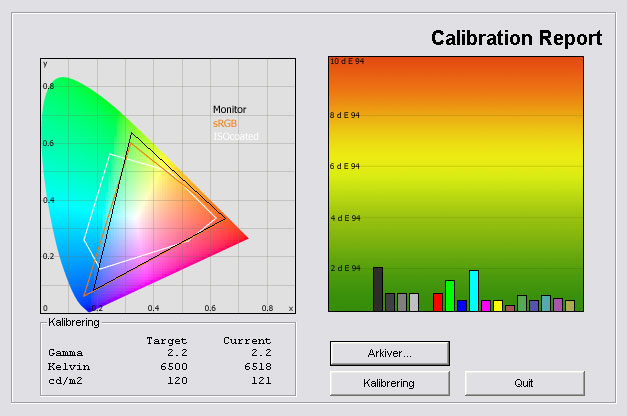
Okay, I had a chance to play with XL2410T again and did some testing in the Standard preset.

Below you can see the calibrated result. It's better than in the sRGB mode but remember that an ICC profile has also been added. You can try the calibrated settings below the picture.

Image

Color gradation with a calibrated Standard preset is almost identical to color gradation in a default RGB preset on XL2410T, so please refer to the actual review for more information. The same goes for shadow detailing. The Standard preset crushes some dark details be default. My calibration improved shadow detailing slightly but not much.

The color gamut is not perfect in the Standard preset either.

The calibrated settings are:
Brightness: 42
Contrast: 50
Sharpness: 3
Gamma: 2.2
Color Temperature: User Mode
Red: 93
Green: 89
Blue 97

I will add these updated tests results in the XL2410T review, too.
By Dalle
#5443
I have the exact same problems with the defect pixels on the bottom... Did any of you guys contact benq? Or what did you do?
By djfunk
#5445
They are not defective pixels but artifacts resulted by the AMA feature. Turning the AMA off will result a normal picture and no I have not contacted BenQ about this issue yet.
By tqz
#5446
Rasmus Larsen wrote:Okay, I had a chance to play with XL2410T again and did some testing in the Standard preset.

Below you can see the calibrated result. It's better than in the sRGB mode but remember that an ICC profile has also been added. You can try the calibrated settings below the picture.

Image

Color gradation with a calibrated Standard preset is almost identical to color gradation in a default RGB preset on XL2410T, so please refer to the actual review for more information. The same goes for shadow detailing. The Standard preset crushes some dark details be default. My calibration improved shadow detailing slightly but not much.

The color gamut is not perfect in the Standard preset either.

The calibrated settings are:
Brightness: 42
Contrast: 50
Sharpness: 3
Gamma: 2.2
Color Temperature: User Mode
Red: 93
Green: 89
Blue 97

I will add these updated tests results in the XL2410T review, too.
What was the black level at these settings?
By squad
#5452
I also got Image 2 little white bars one center bottom and one right bottom. But how do I fix this, don't want to send in the monitor for only these 2 things. Plus they disappear when you play games sometimes or forget bout it but is there a fix for it?
By Dalle
#5453
it seems its caused by the AMA option... I turned it off and they disappeared. And I'm not noticing any difference with AMA enabled / disabled so that solved it for me =D
By squad
#5454
Dalle wrote:it seems its caused by the AMA option... I turned it off and they disappeared. And I'm not noticing any difference with AMA enabled / disabled so that solved it for me =D

What AMA suppose to do anyways?
By Vagge
#5476
Can somebody explain how to create/use a ICC-profile so I can use the new settings for this monitor?

/Vagge...
By bilboa
#5501
I agree with all the comments that have been made. That said I found something more.
User game 1 almost eliminate the blue bottom bleeding. Unfortunately the sharpness in this mode is really bad, and the saturation is kind of weird (might be possible to fix via the graphic card drivers, but the sharpness?)

I also figured that the eco, sRGB and standard mode disable senseye (so senseye is what kills the colors the most - but also its this only thing that can fix the blue bleeding..)

Finally, I wondered if my panel bleeds too much. In games and movies its really noticable..

Left side is the benq, full brightness and sharpness (worse case bleeding), right is a belina 102035W which is a PMVA panel
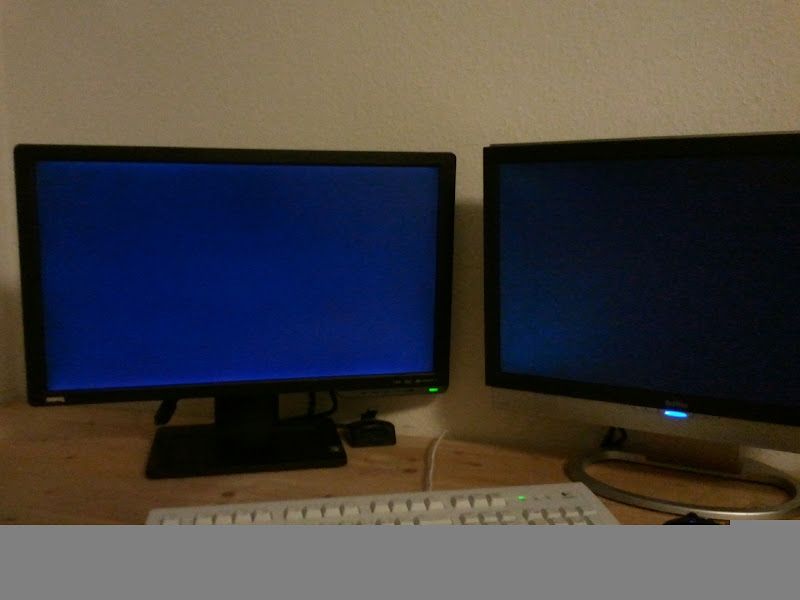
Image

I can still return it if somehow the bleeding would be too bad. In games and movies with lower settings I "only" see the 15% of the bottom of the screen with blue bleeding