Android TV 14: Energy Modes, Shortcut button, Calls, easier headphone pairing
Android 13 will not be available for TVs after all but Android 14 brings new features such as Energy Modes, a Shortcut remote button, call notifications, easier headphone pairing, and more. Google confirmed that it is "retiring" Android 13 for Android TV, moving straight to Android 14. The company did not provide details on what's new in version 14 but journalist Mishaal Rahman has discovered a handful of new features in the beta.Shortcut button, headphone pairing, calls
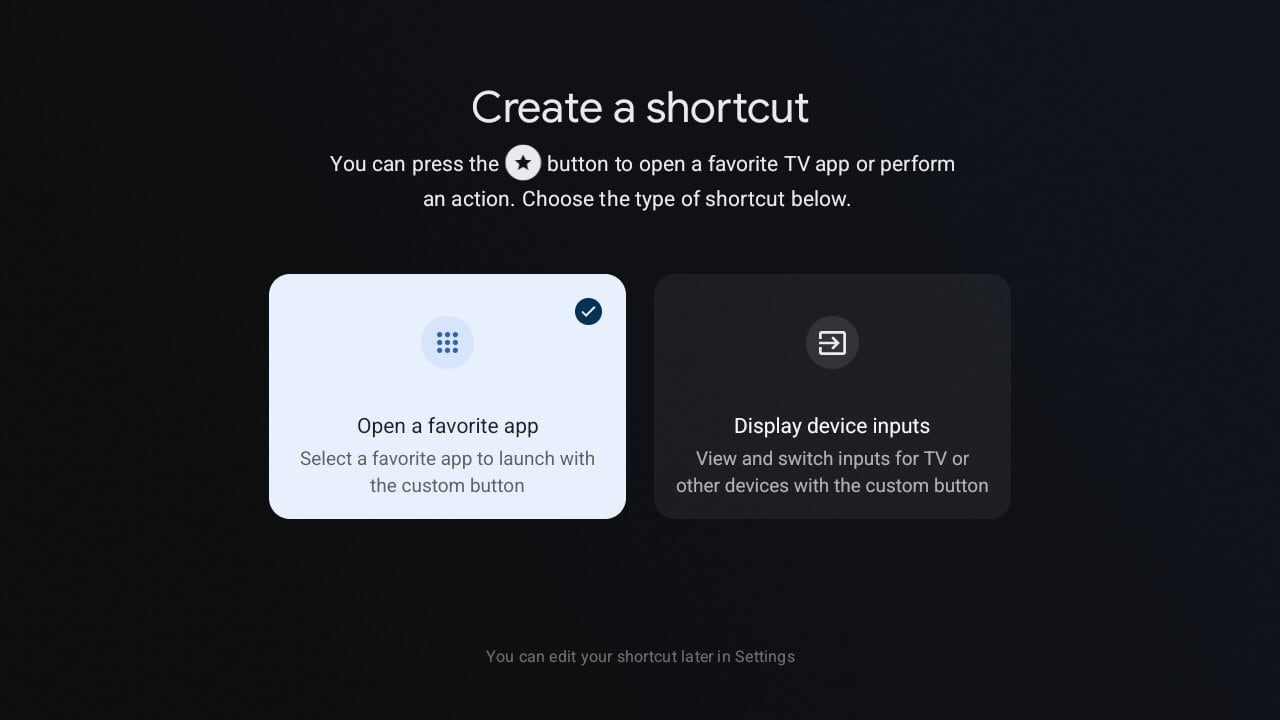
Call notifications on Android 14 for TVs will let the user receive calls from supported apps on their TV or media player. - "When enabled, you can receive calls from supported apps on this device. To adjust preferences for call notifications for individual apps, please refer to the settings in the respective apps. Call notifications only show while you are in your personal user profile on this TV. You can adjust this setting in other profiles, to also receive calls when those profiles are active," a feature description in Android 14 reads. There is a new "magic button" feature which is a shortcut function to a specific app or HDMI port that can be user customized and subsequently enabled by pressing a star key on the remote control. Current remote controls do not come with a star key but it is possible that it is a reaction to the many unwanted sponsored buttons.
Android TV 14 lets the user create a shortcut and assign it to a star button on the remote. Screenshot: Mishaal RahmanMishaal also discovered references to a new headphone option to make it quicker to connect Bluetooth headphones. It might show up as button in the control center but the software crashes so it will have to be confirmed later.New Energy Modes
Energy Modes is a new feature that makers of TVs and boxes can implement based on hardware capabilities, and present to the user as standby options:
Other tweaks
'Accessibility' is now a top-level menu in Settings rather than being tucked away. There are new options for 'Bold text' and 'Color correction'. Under Display settings it will be possible to "always force conversion" to HDR10, HDR10+, HLG, Dolby Vision or SDR. We will report back if other new features or tweaks are found in this beta or later betas while we wait for Google's official announcement closer to launch of Android 14 for Android TV and Google TV devices.
The Accessibility menu is easier to find and has new options. Screenshot: Mishaal Rahman

One of the new Accessibility option is 'Color correction'. Screenshot: Mishaal Rahman
- Source: Google, Mishaal Rahman