For the first time in an iPhone with OLED, the user can disable PWM, which is good news for people who experience eye strain, headaches or dizziness from screen flicker.
Update: It has been confirmed that the toggle is available in all versions of iPhone 17 – not only the Pro.
PWM (Pulse Width Modulation) is one of two methods used to control brightness in OLED and LED LCD. Here, brightness is not adjusted by changing the current, but by turning pixels – or the LED backlight – on and off in very fast intervals.
The lower the brightness, the longer the pixels remain off, and the higher the brightness, the longer the pixels remain on. The eye perceives this flicker as dimmed brightness, but it is an illusion, and some people are directly or indirectly affected by the flicker, especially at low frequencies (Hz), which can cause eye strain, headaches or dizziness.
Also read: LED Monitors can cause headaches due to flicker
When you look away after using an OLED phone, you may have noticed a wave-like effect moving diagonally across your vision for a few seconds. This happens because PWM in modern displays often runs diagonally instead of vertically from top to bottom, as illustrated below.
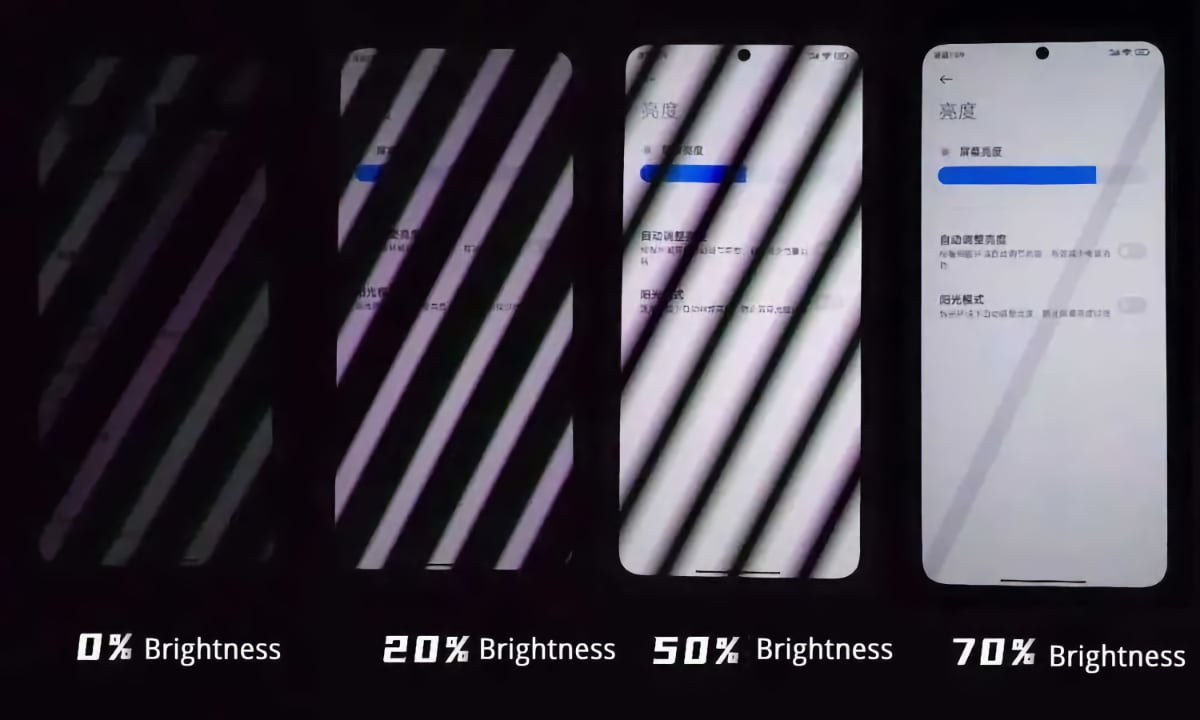
PWM effect captured on camera with a fast shutter speed. Photo:
DisplayManDisable PWM on iPhone 17
The alternative to PWM is DC dimming (Direct Current), where screen brightness is controlled directly by adjusting the current up and down. This is how, for example, OLED and QD-OLED TVs are controlled – they are PWM flicker-free.
PWM, on the other hand, is common in handheld devices with OLED. It is an easier and cheaper way to control brightness, and it does not affect color temperature at very low brightness levels.

iPhone 17 is the first to let users disable PWM. Photo: Apple
With the launch of iPhone 17, Apple finally provides users the option to switch from PWM to DC for brightness control, so the screen does not flicker, according to MacRumors and references to a new Accessibility setting in iOS 26 under 'Display & Text Size':
- "Disables pulse width modulation to provide a different way to dim the OLED display, which can create a smoother display output at low brightness levels. Disabling PWM may affect low brightness display performance under certain conditions," reads the description in iOS 26.
The setting is confirmed for all versions of iPhone 17.
Google recently added a setting to increase the PWM frequency to 480Hz on the Pixel 10, but PWM still cannot be disabled.
iPhone 17 will launch on September 19, after which the feature can be tested. All of the new iPhones also feature 120Hz OLED.
- Source: MacRumors