Review: 115" TCL X955 Max / QM891G
TCL's largest TV, and one of the largest TVs to date, is the 115-inch X955 Max in Europe or the 115-inch QM891G in North America. It is also TCL's most advanced miniLED LCD TV, featuring more than 20,000 dimming zones and over 5,000 nits peak brightness, according to TCL. Here's FlatpanelsHD's review. After the switch away from Roku, we have received confirmation that TCL's Google TVs are now identical in Europe and North America in terms of the panel, miniLED backlight, SoC, and other technical details. The only major difference remains the model names. We have tested the European X955 Max but the review also applies to the American QM891G.Price and retailers:
US retailer
coming soonUK retailer
DE retailerFirst impressions
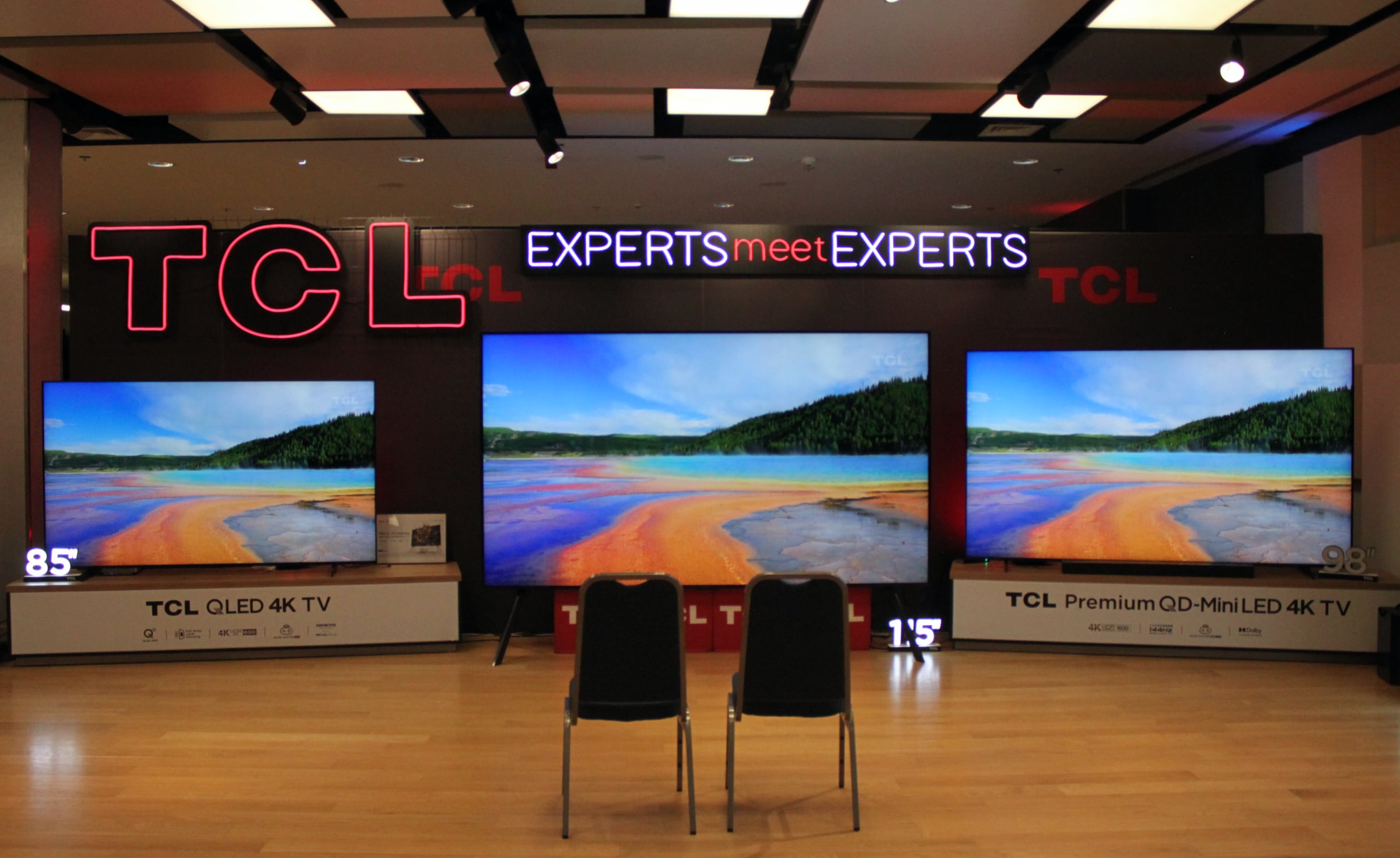
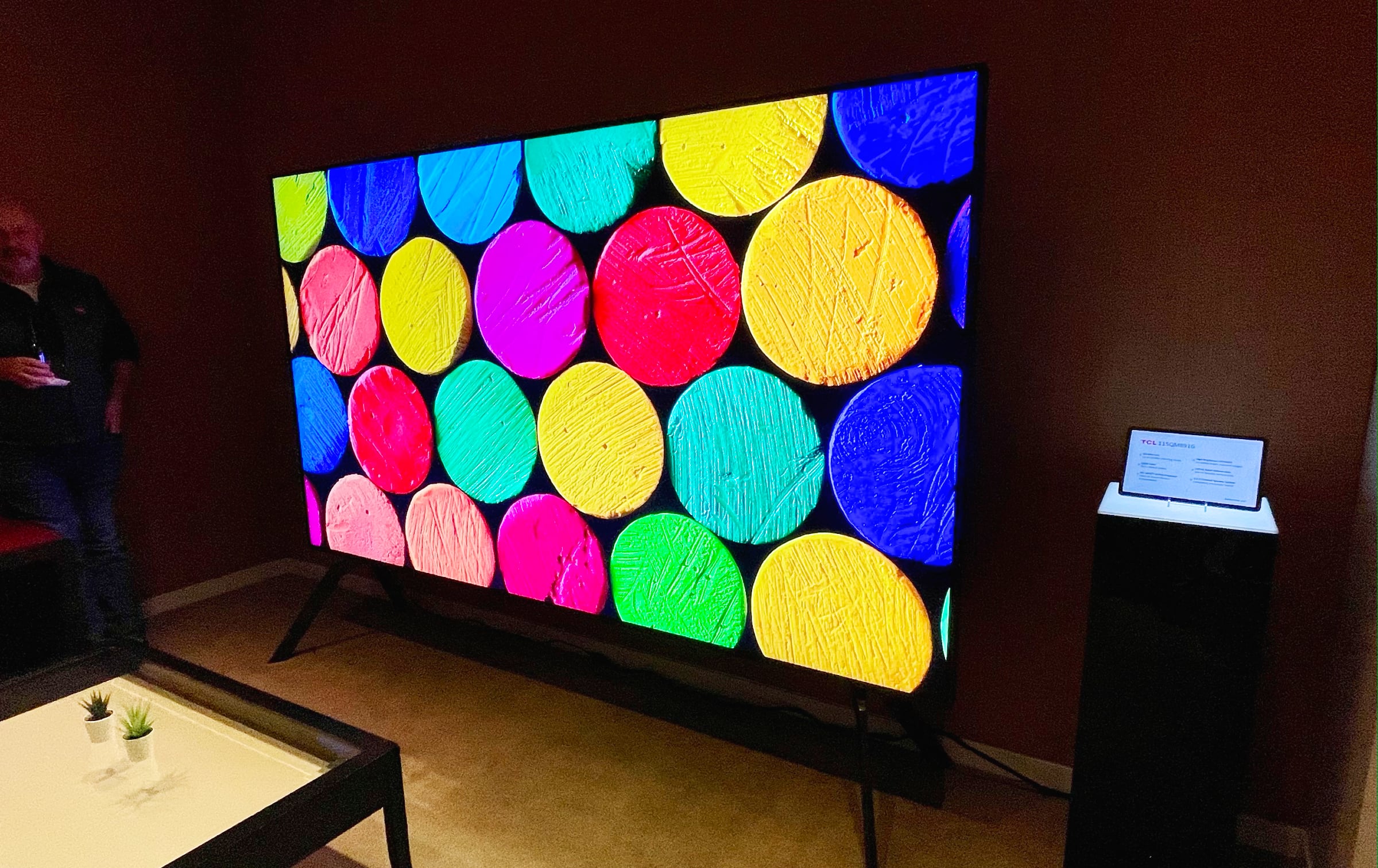
Before we start, we must note that the 115-inch TV was not tested in our lab due to the challenges of transporting it. Instead, we had full access to a sample in a room provided by TCL in Poland. Here, we spent two days measuring, testing and viewing. Due to the time constraints of two days, our test was slightly abbreviated to exclude calibration, but we felt that we achieved a level of in-depth examination qualifying as a full review, albeit with a disclaimer acknowledging that we might have missed a thing or two. At 2.5 meters in width, 1.5 meters in height, and a weight of almost 100 kilograms, the 115-inch TV is very big but not ginormous. It is still possible to hang it on the wall, and there is also an optional floor stand available if your TV furniture is too narrow for the bundled TV feet. The 115-inch model is bulkier than the smaller sizes of X955 (Europe) and QM851G (America), with a deeper profile, but still looks relatively sleek for such a large device. Here it is compared to 85-inch and 98-inch TVs: Notice how especially the 85-inch looks small in comparison, which makes sense when you consider that the screen area – measured diagonally – of a 115-inch is 83% larger than an 85-inch.
85" TV (left), 115" TV (middle), 98" TV (right). Photo: FlatpanelsHDAnd here it is with a TCL representative for scale. This photo was taken in January at CES 2024 of the QM891G for North America:
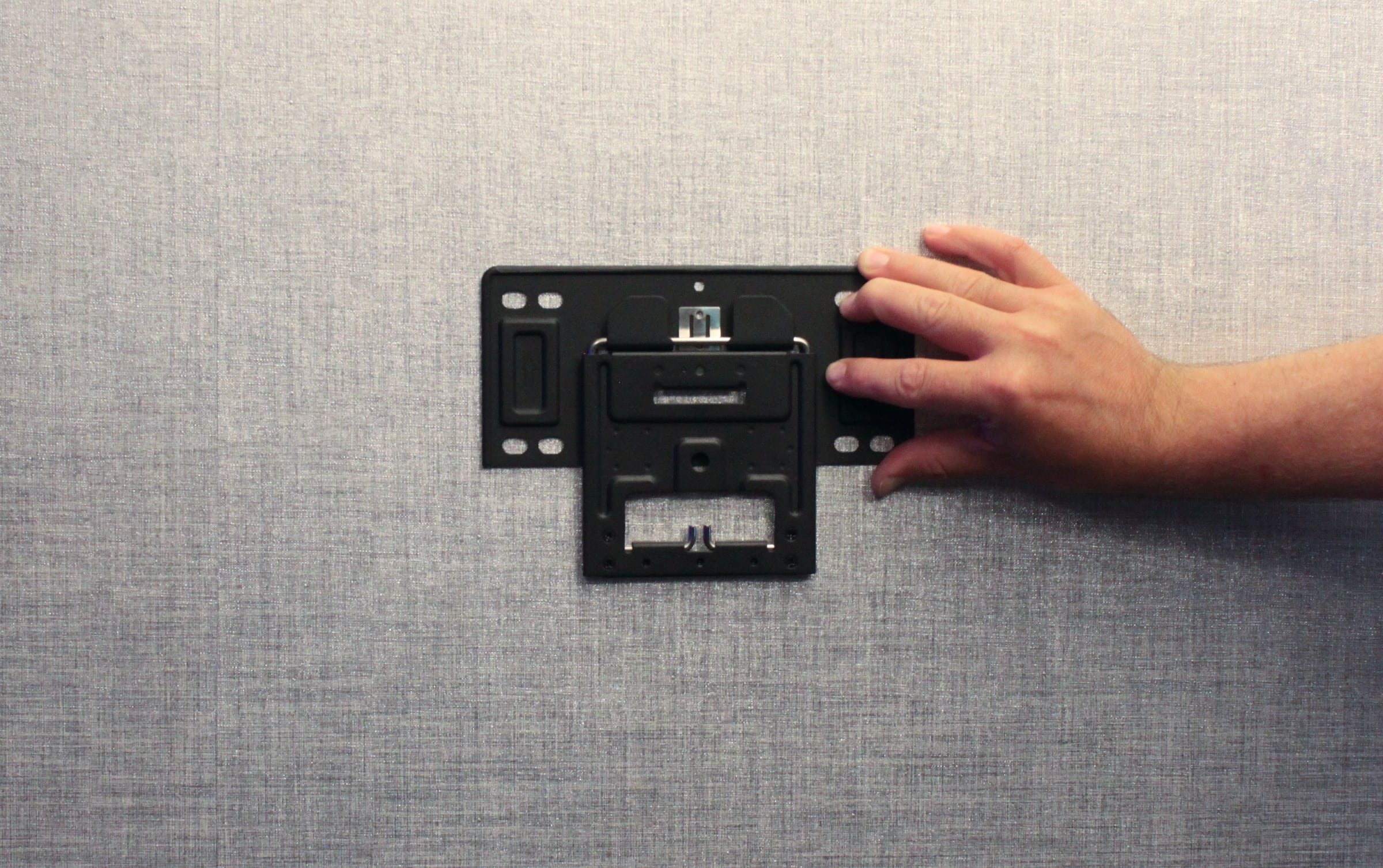
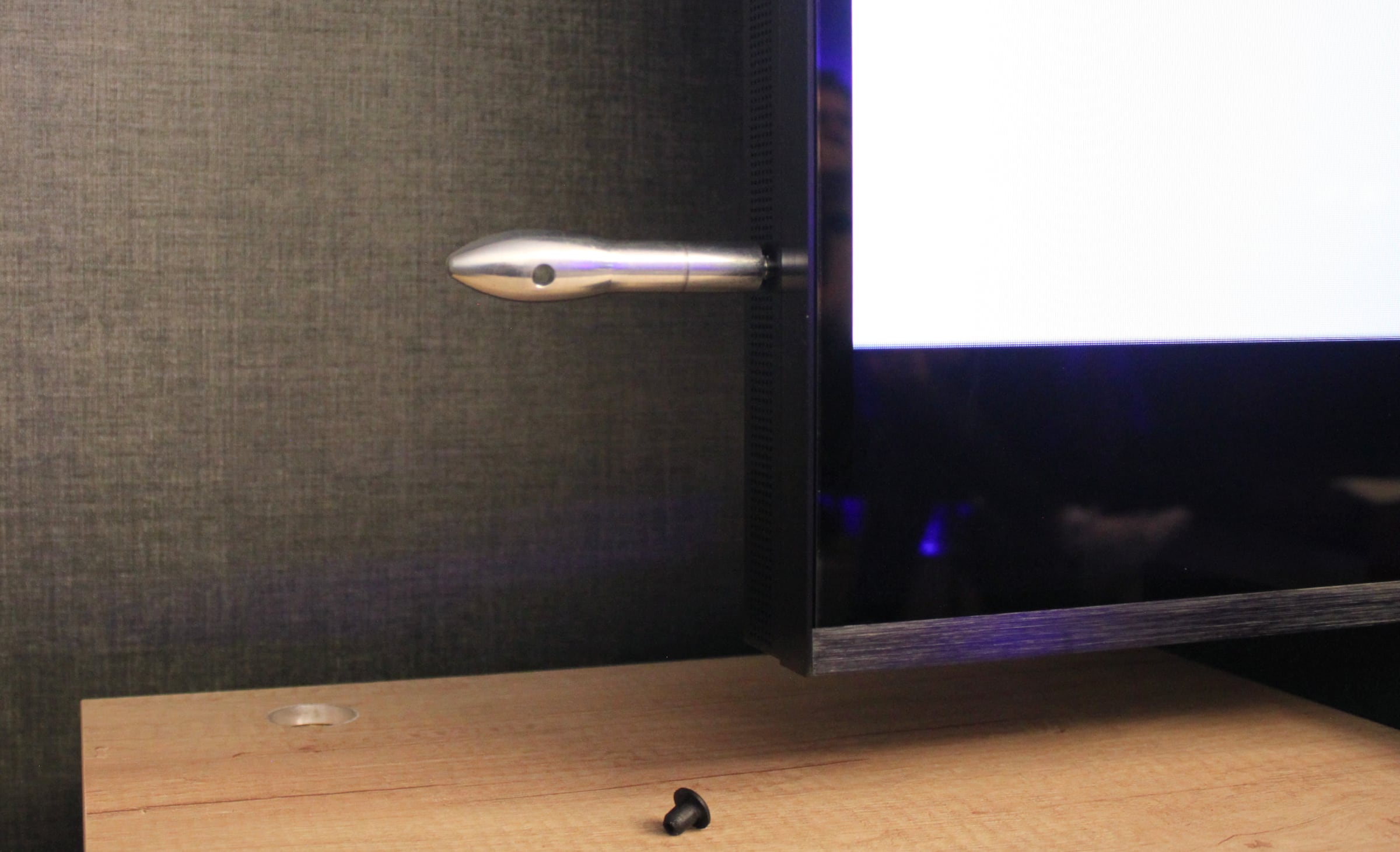
TCL's 115-inch QM891G. Photo: FlatpanelsHD at CES 2024We did not assemble it ourselves, but we did try to mount the carrying handles. There are four in total to help two or three people move it. The most impressive thing, however, is the included wall bracket solution. It is so slim and light that it is hard to believe that the wall brackets (there are two of them) can carry the 115-inch TV, but TCL assured us that they can. You can even flip it out from the wall by pulling the bottom part for easier access to the inputs. Kudos to whoever came up with this wall bracket solution. The ports are all located inside a small opening. There are four HDMI inputs, but only two of them are HDMI 2.1 with up to 4K 144Hz. eARC has been moved to one of the HDMI 2.0 ports, which is either an advantage or disadvantage, depending on your use case. It means that future media players, such as Apple TV or FireTV with eARC for wireless speaker connection, will be limited to HDMI 2.0 bandwidth, but for game console use, it ensures that you can connect both PS5 and Xbox Series X. You will also notice that the back of the TV has a streamlined look with small black plastic panels. There are two bass ports in the middle.The input ports, wall bracket (2x required) and carrying handle. Photos: FlatpanelsHDUser experience & features
We confirmed that our sample of the 115-inch features the MediaTek Pentonic 700 SoC (MT5896) with 2.5GB RAM and a Mali G52 GPU. This SoC comes pre-installed with Android 12 and the Google TV user interface. It is the exact same system chip platform as in other 2024 TCL Google TVs, except that TCL has increased the storage from 20GB to 49GB in X955 Max / QM891G (46GB free after setup) – way more than in most Google TV devices. Since the SoC and the Android version are unchanged, we refer to our earlier review of TCL C805 for benchmarks compared to earlier TCL models as well as Sony Google TVs, Nvidia Shield, and Apple TV 4K. A TCL Google TV works similarly to other Google TVs, but TCL has made some customizations to the settings menu.Google TV is one of the most robust integrated TV platforms with access to all of the popular streaming apps, although an increasing number of obtrusive ads are seen on the homescreen in many regions. This is controlled by Google and can be changed through a server-side update – no new firmware or software required. Google TVs always have built-in Google Cast (née Chromecast) and TCL also offers Apple AirPay 2. Like other TCL TVs, there is also a fairly large selection of free channels with ads that can be streamed over the internet. You can access these with the 'TCL Channel' button on the remote. The TV supports WiFi 6 and Bluetooth 5.0, and while these are not the very latest standards, they should keep you going for many years. Bluetooth allows you to connect headphones as well as game controllers for use with cloud gaming apps such as GeForce Now. The Xbox cloud gaming app is still missing on Google TV. AV1 video decoding worked as expected, but there is still no support for VVC (H.266). A practical note is that HDMI CEC (TCL calls it 'HDMI control') was again turned off by default. If you want the TV to turn on/off with other devices, you can enable it under Channels and Inputs -> External Inputs. This is a prerequisite for HDMI ARC/eARC.Google TVs – CPU/GPU benchmarks
FlatpanelsHD
Geekbench 4 3D Mark - Slingshot Extreme GFXBench - Manhattan 3.1 (offscreen) GFXBench - Aztec Ruins (offscreen) MediaTek MT5889 (TCL C845 X1) Single: 929
Multi: 2256423 277 frames 173 frames MediaTek Pentonic 700 MT5896 (TCL C805, X955/QM891G) Single: 971
Multi: 2452421 - - MediaTek MT5895 (Sony XH90, X90J, X90K, X90L) Single: 1195
Multi: 28821148 958 frames 605 frames MediaTek Pentonic 1000 MT5897 (Sony A95L) Single: 1359
Multi: 33421913 - - Nvidia Shield TV Single: 1400
Multi: 41004250 2765 frames 2250 frames Apple A10X (Apple TV 4K 1st Gen) Single: 4000
Multi: 9500- 4500 frames 3300 frames
Google TV on TCL X955 / QM891G. Photo: FlatpanelsHDOperation
X995 Max and the smaller X955 sizes come bundled with a new remote control in silver. The same is not true for the American equivalent QM851G, which comes with the standard remote. The number of buttons is drastically reduced, but there are still too many for our taste, including four sponsored buttons. A preferable option would be four user-configurable shortcut buttons. The new remote control feels much nicer than the rubber remote that comes bundled with cheaper TCL models, but still feels too cheap for a TV this expensive. The plastic construction and button tactile feedback could be improved in my opinion.
TCL's premium remote control for X955 Max in Europe. Photo: FlatpanelsHDTV audio
The 115-inch is equipped with a 6.2.2ch (down-, up-, and side-firing) Onkyo 120W audio system with support for both Dolby Atmos and DTS:X. I have not been very impressed with TCL's built-in TV speakers in the past. This speaker system is definitely an upgrade over the speakers in TCL's mainstream C805, which were severely lacking, making it a better option for casual viewing. There is a slight Dolby Atmos overhead effect, but it is not as pronounced as with some dedicated Atmos soundbar systems. While object-based Dolby Atmos offers other advantages beyond overhead effects, TV speakers struggle to fully realize these benefits. The speakers still sound somewhat enclosed, and the bass is not very powerful either, but for me personally, built-in speakers in a home cinema system would be a total no-starter anyway. For a true home cinema experience, an external sound system is essential. Period. TCL supports both Dolby and DTS audio decoding. Recently, Disney+ was the first streaming service to add support for DTS:X audio as part of the IMAX Enhanced initiative. We checked to see if TCL's 2024 models have access to the DTS:X track from Disney+, but despite having the app fully updated and having the IMAX Enhanced stamp of approval, it did not work. TCL said that it will look into the matter.Calibration
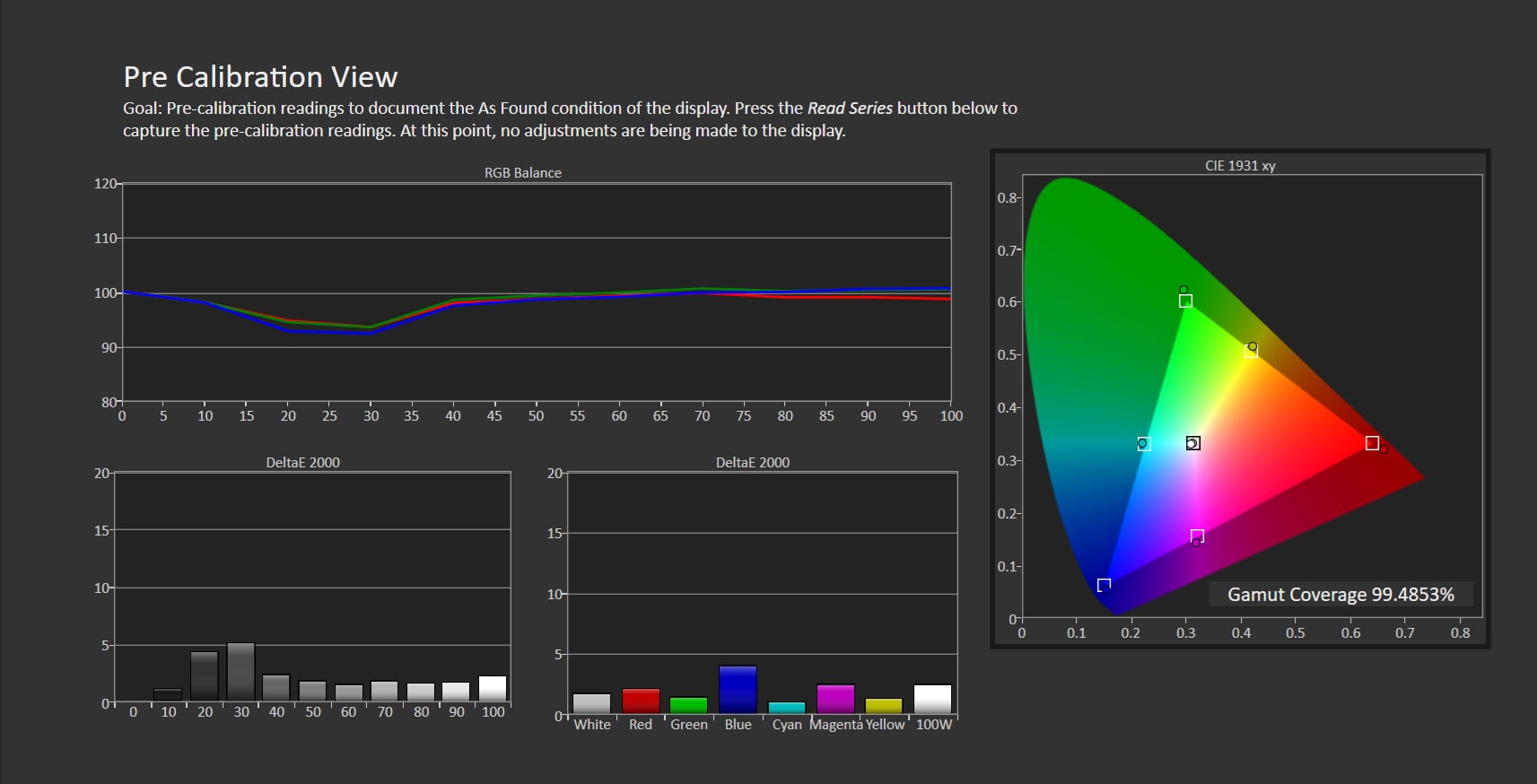
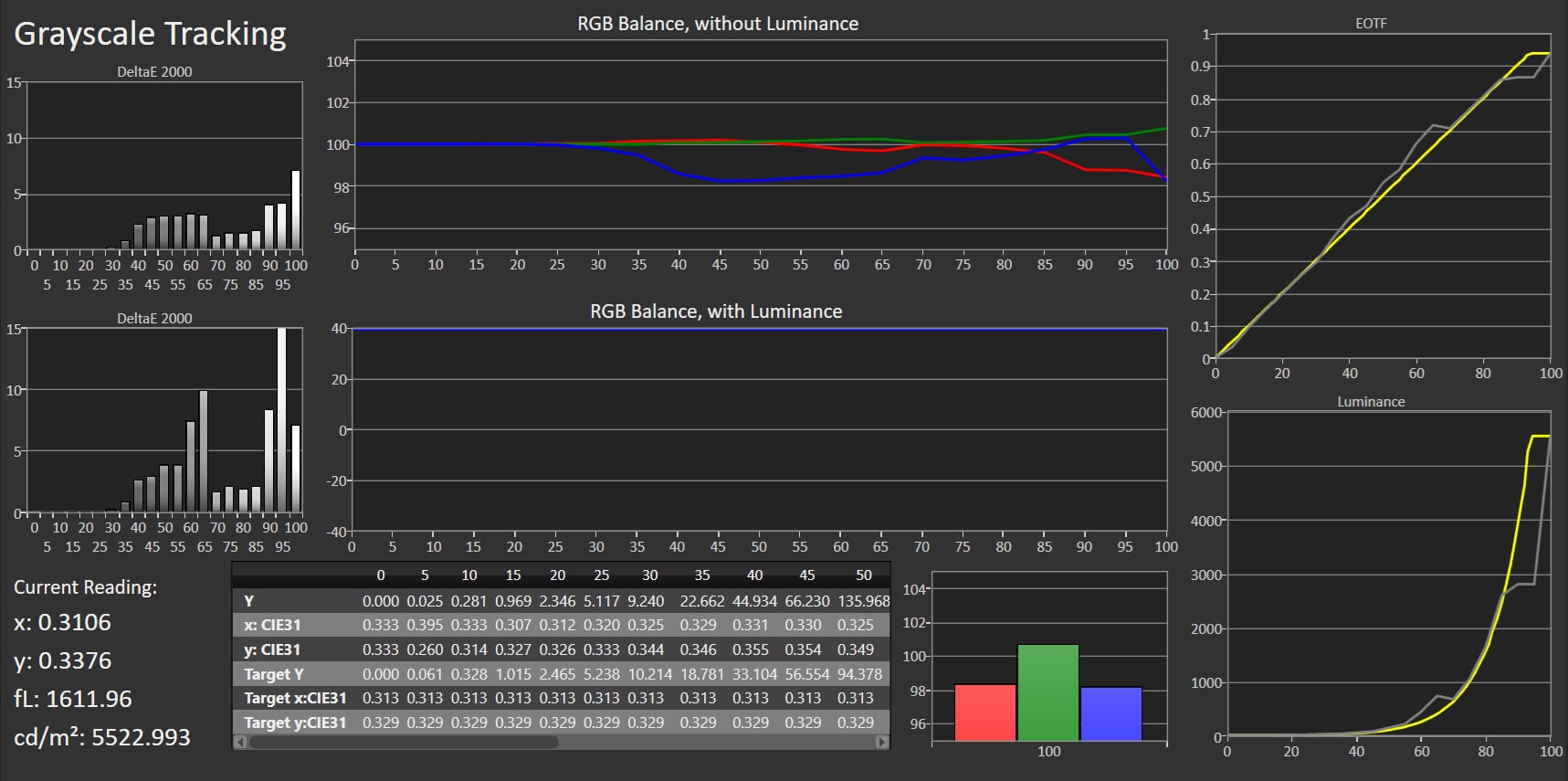
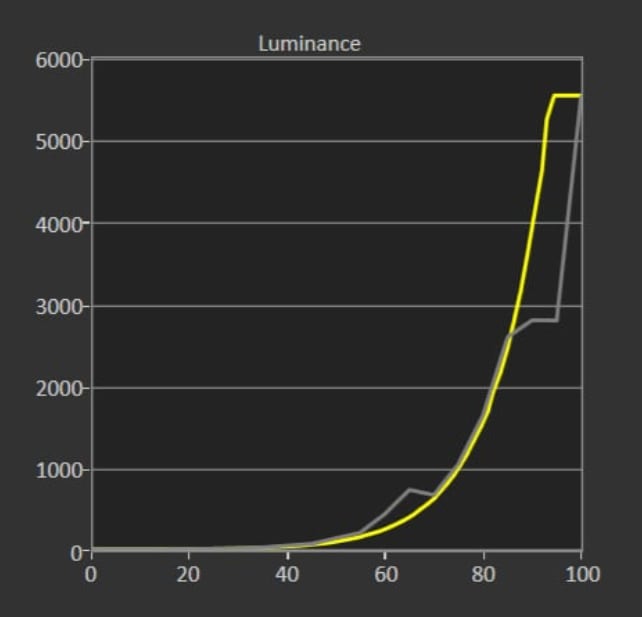
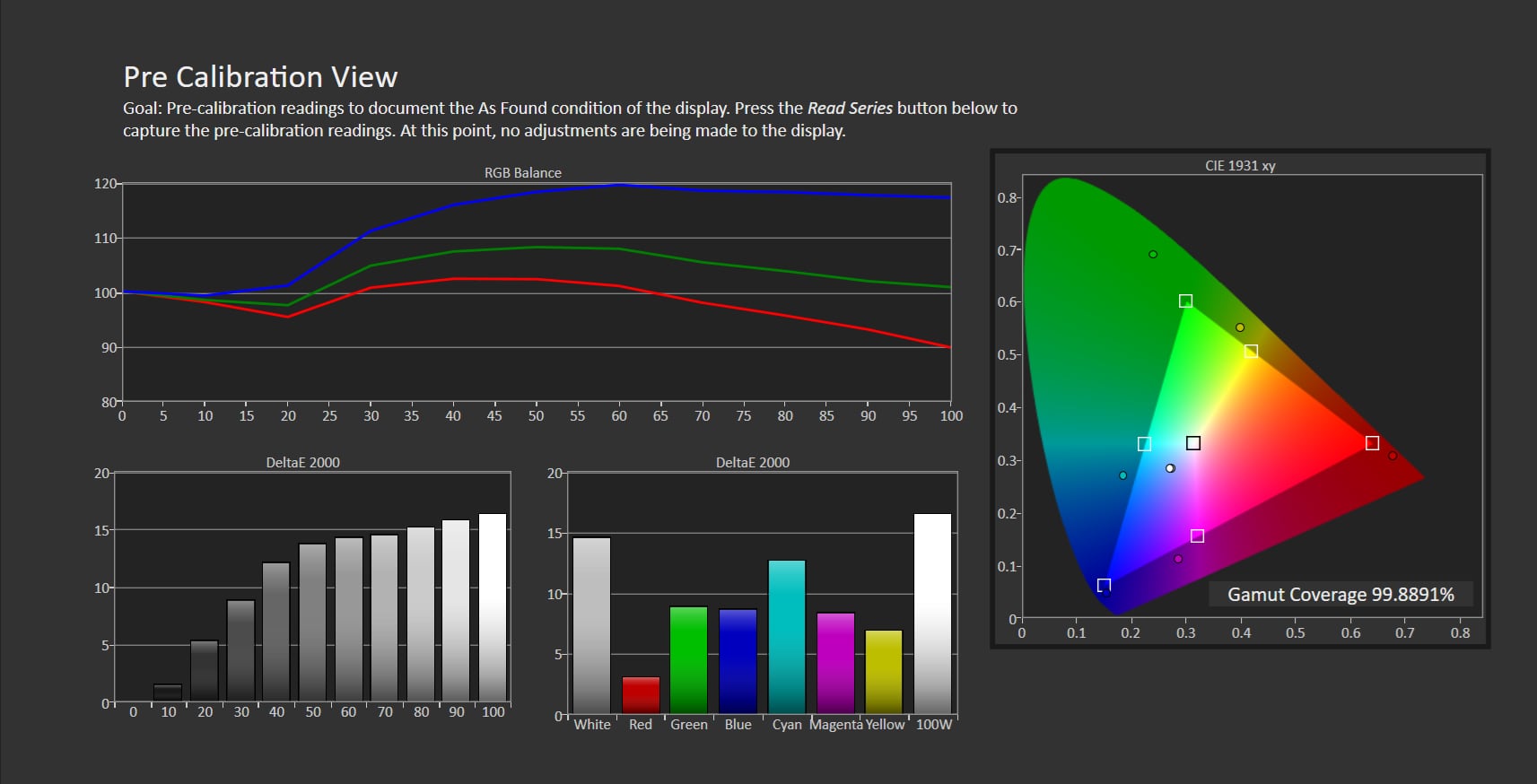
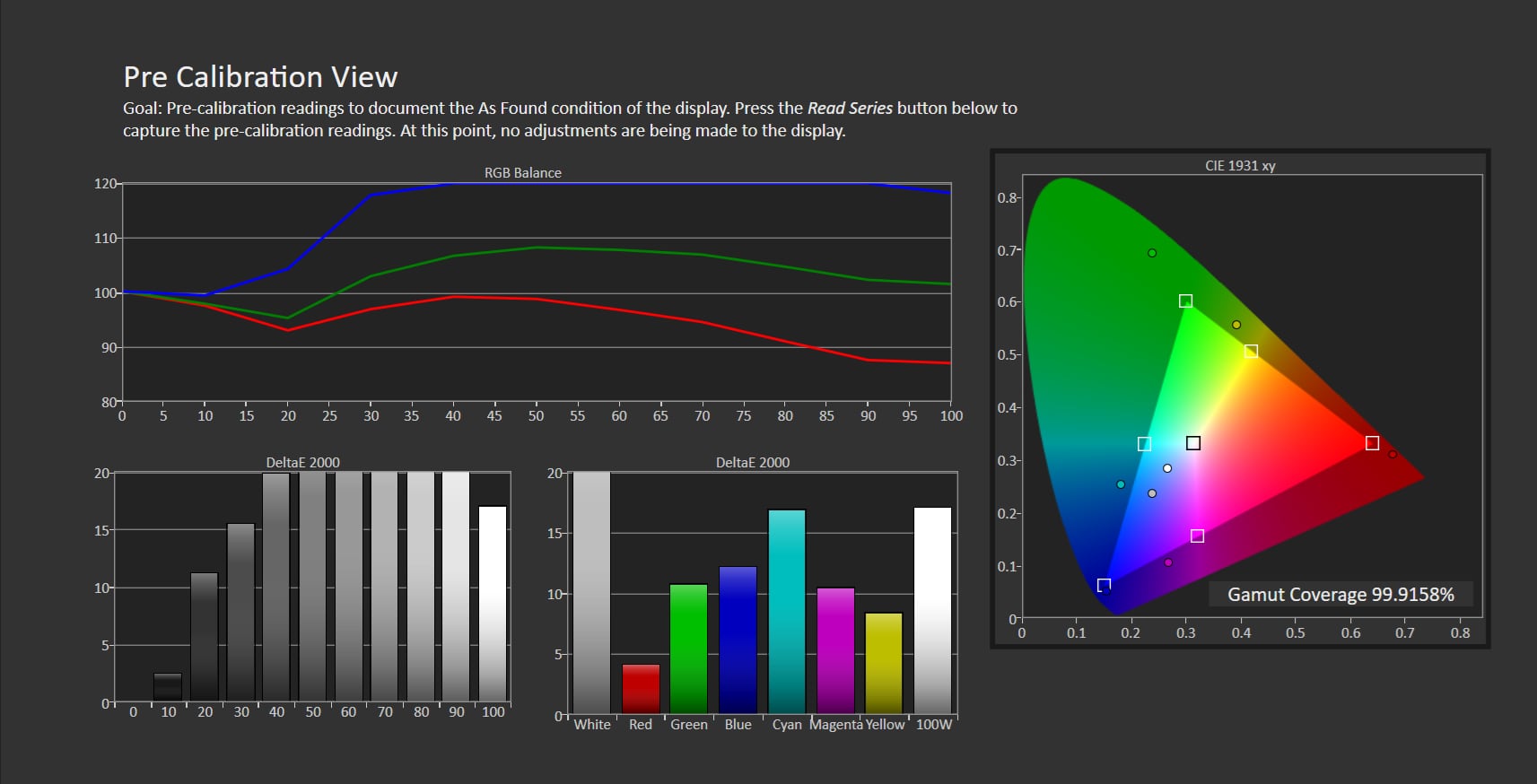
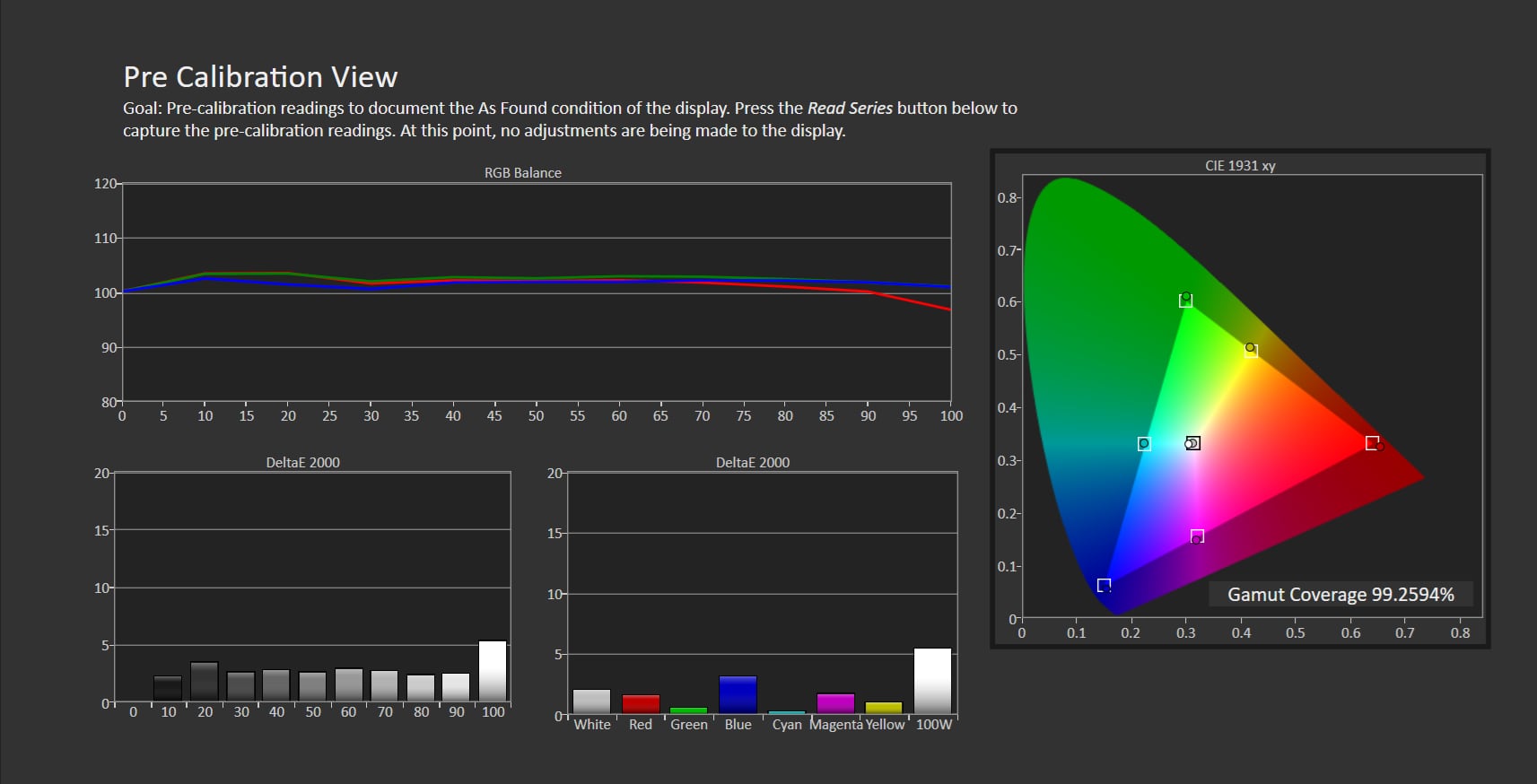
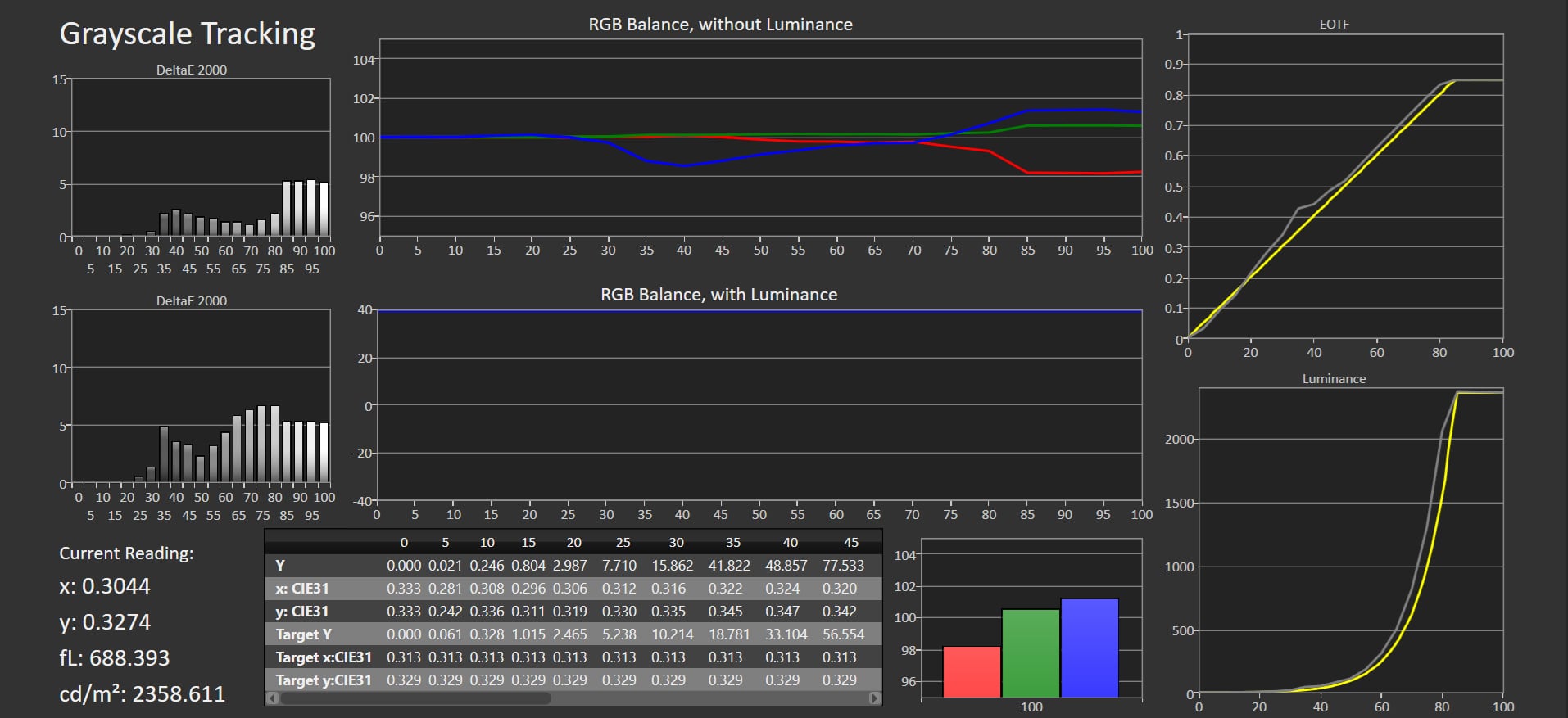
The miniLED backlight can produce such high luminance that the screen sometimes becomes excessively bright. I would caution against switching the TV to 'Dynamic' mode in a dark room. Besides colors being saturated and bright in Vivid mode, it can actually approach 1000 nits in full-screen (100% window), which is not pleasant to look at all. You can see our measurement of the 'Dynamic' HDR mode – and other picture modes – in the table to the right. As always, our recommendation is to use the 'Movie' mode for HDR, as it generally provides the most accurate picture, although it was not as accurate as we had hoped. The luminance fluctuates too much, likely due to the powerful miniLED backlight that proves challenging to control. Color accuracy was decent. The 'Game' mode offers similar accuracy to 'Movie' mode, but it does not utilize the miniLED backlight's boosting feature. We will elaborate on the boost mode in the picture quality section. Notice, in our measurement below of 'Pre calibration (HDR Movie)' mode, that the boost mode operates by allowing the TV to reach its native peak brightness of around 2500–3000 nits, then gradually roll off to preserve high-brightness details, before abruptly boosting to 5500+ nits without intermediate steps between ~3000 and 5000 nits. Read on to understand its impact on the viewing experience. The TV covers 96% of the DCI-P3 and 74% of the Rec.2020 color gamuts, slightly exceeding previous miniLED LCD TVs from TCL. In SDR, the same principles apply: Avoid the 'Dynamic' and 'Normal' picture modes as they exhibit extreme color saturation, even in SDR content, pulling colors out into the panel's native gamut. Brightness is also set very high for SDR; even at the lowest brightness slider setting in the picture menu, the 115-inch still exceeds 100-120 nits, typically considered the reference level for SDR. As mentioned earlier, we did not have time to calibrate the X955 Max / QM891G. Hence, we recommend using the pre-configured 'Movie' for both HDR10 and SDR, and 'Dolby Vision Dark' for Dolby Vision content. Remember, the TV allows different picture settings for each HDMI input, so ensure settings are copied to all inputs.Other picture modes
Click the title to expand the view
Standard (SDR) Dynamic (SDR) Game (SDR) Dynamic (HDR) Game (HDR) Measurements
In our "measurements" section we include all measurements and our suggested calibration settings. If you want to learn more about our test methodology click here. Note: Starting last year, we implemented a new method for measurement of average power consumption in SDR and HDR, meaning that earlier measurements are not 1:1 comparable. The new method will be used in all TV reviews going forward.Picture quality
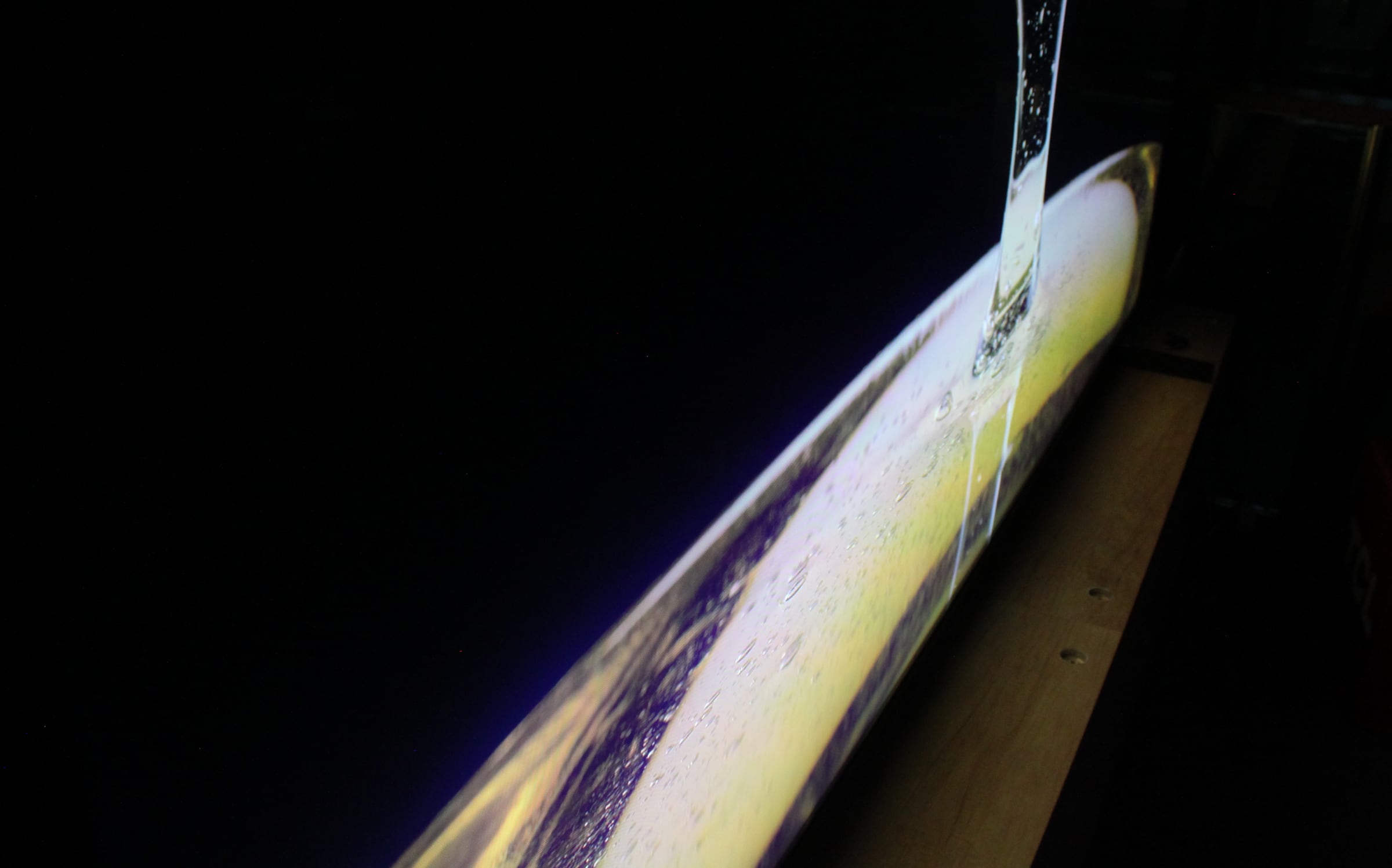
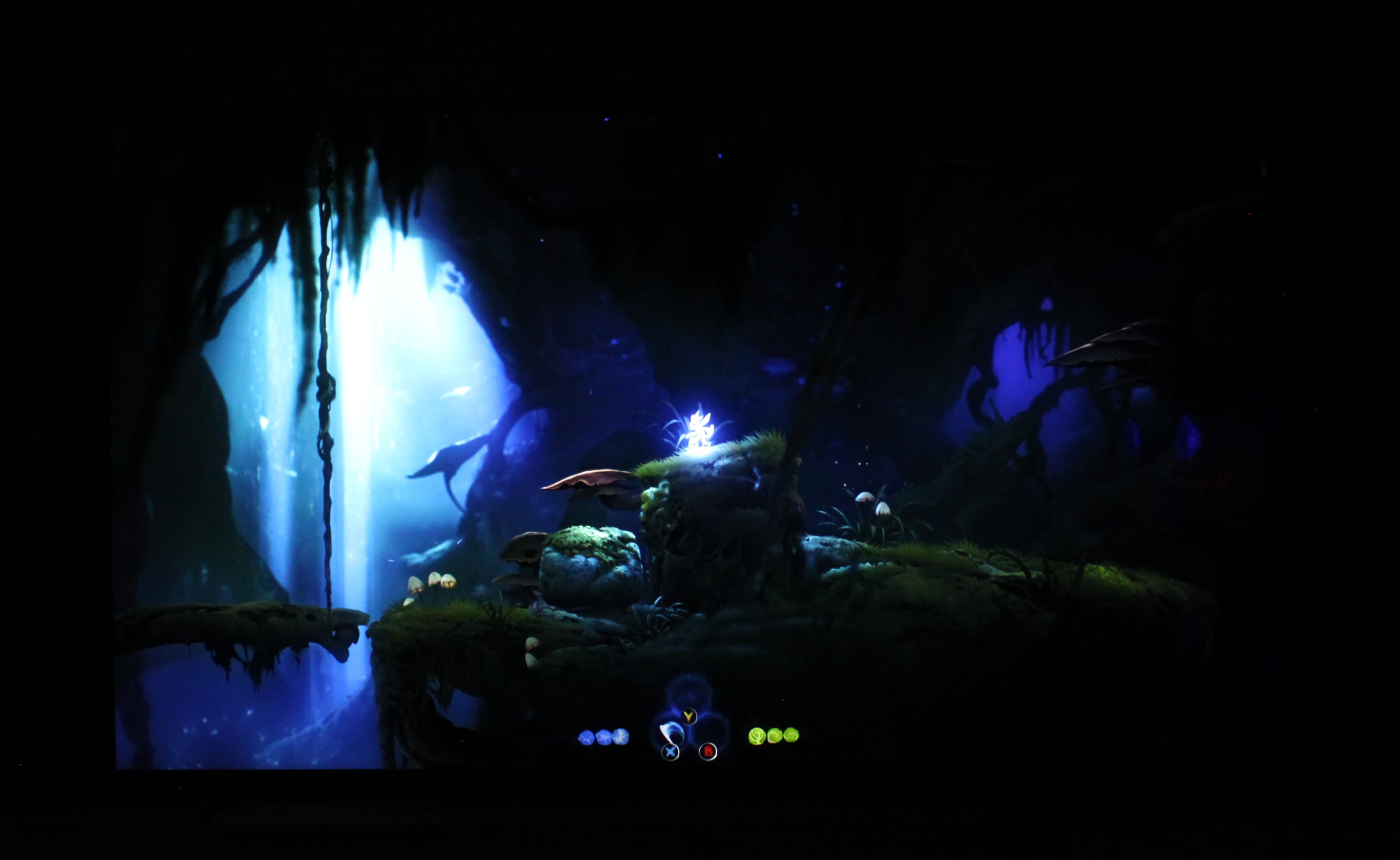
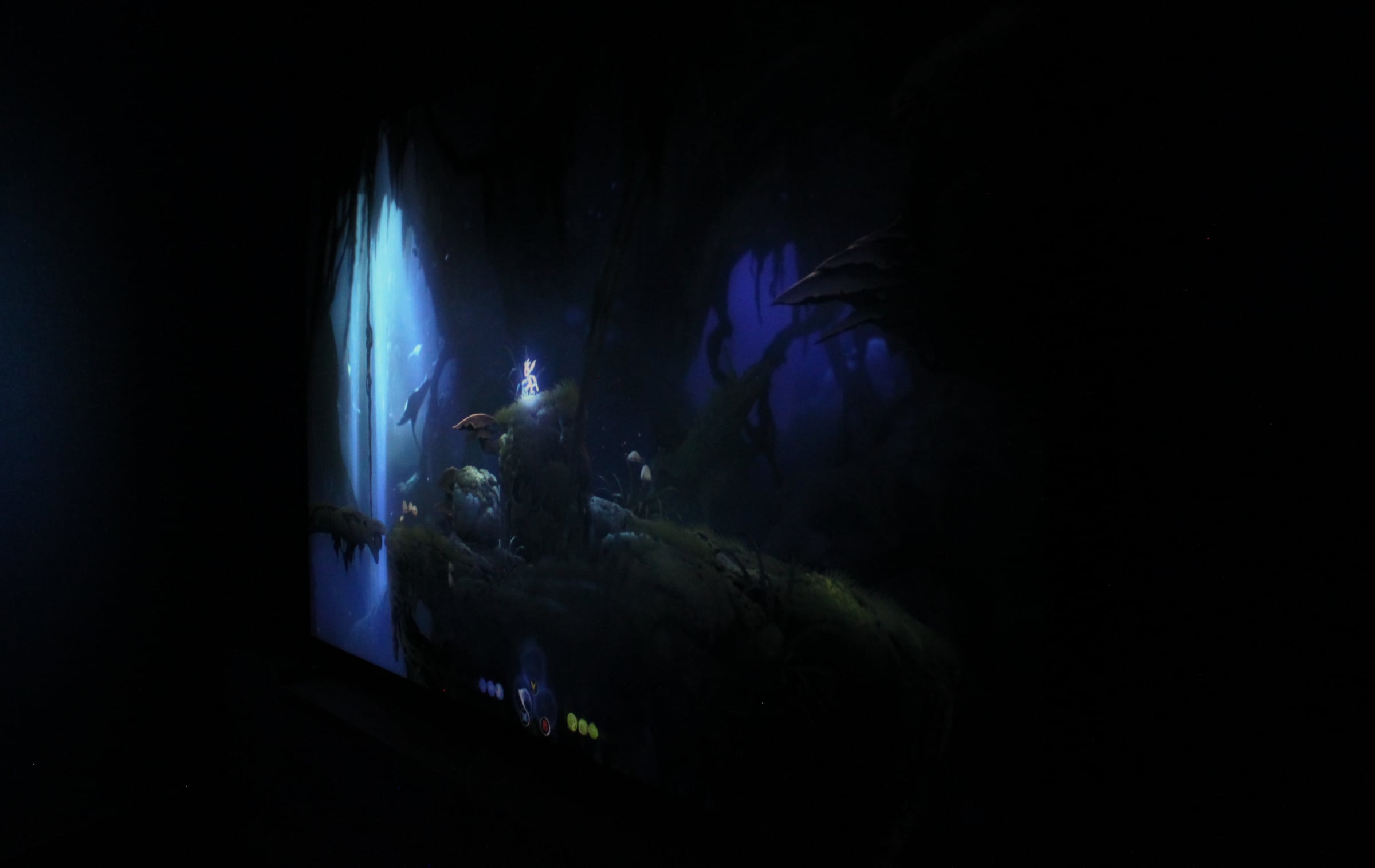
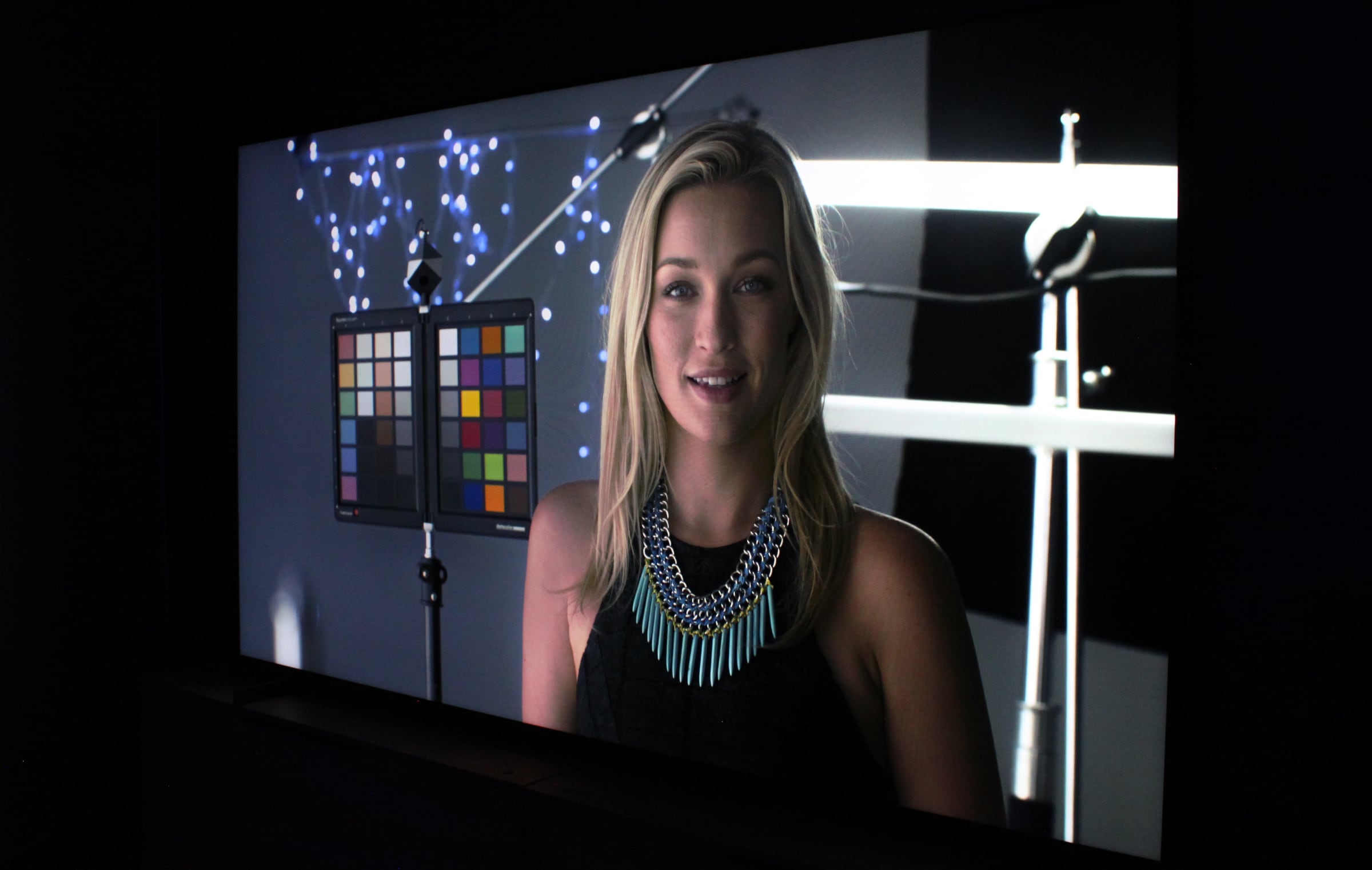
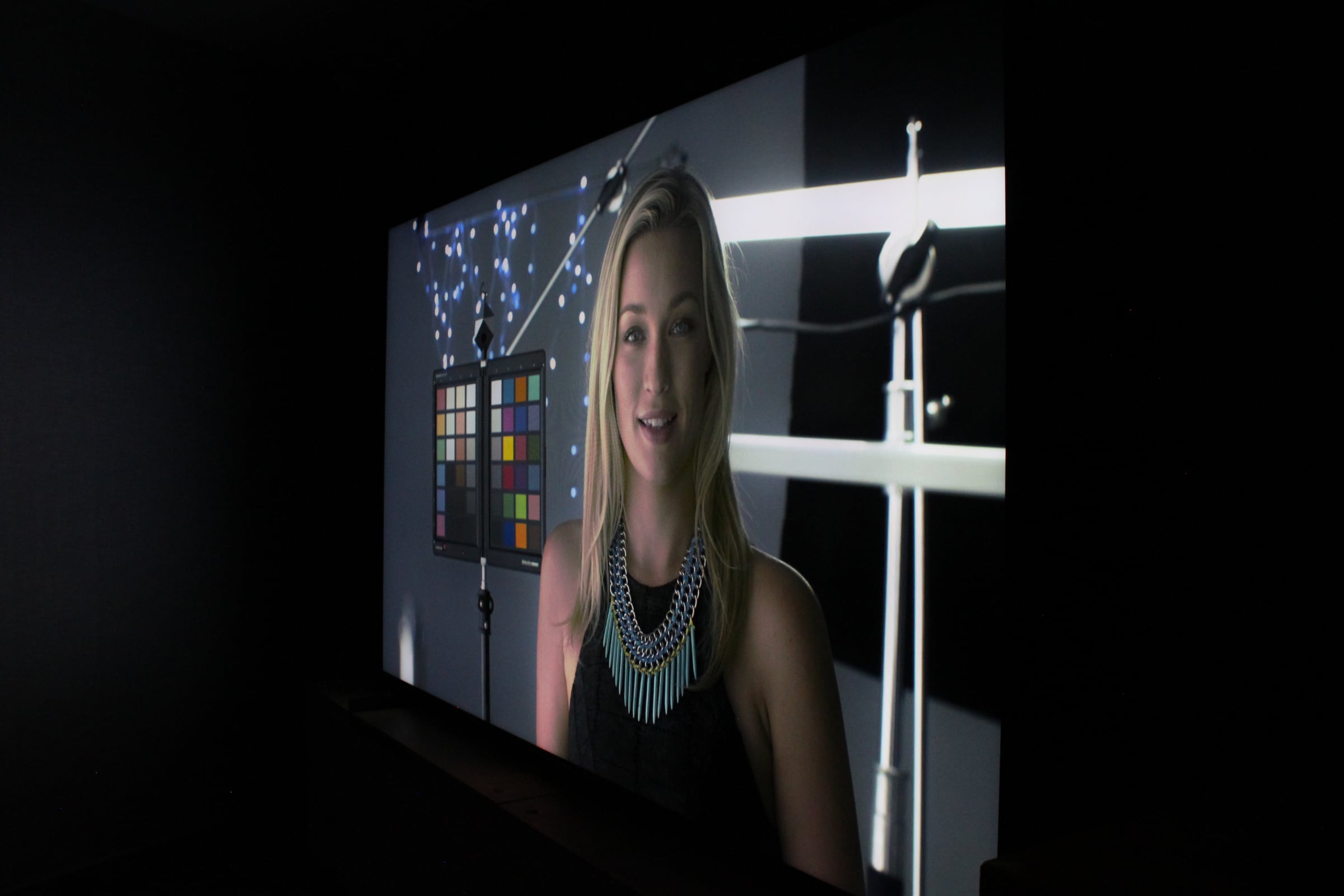
Let us focus on the most important aspect first: The experience of sitting in front of a 115-inch screen. In our review of the 98-inch TCL C805, we concluded that while the 98-inch is a very large screen, it still felt more like a big TV than a true home cinema size and therefore not a true replacement for a home projector. The jump to 115 inches is a tipping point. The screen feels significantly more immersive at 115 inches in diagonal, closer to the size of a home cinema, which makes sense considering that the typical home projector screen size ranges from 100 to 120 inches. I was personally surprised by how much of a difference the extra 17 inches made while watching movies, and I believe 115-inch LCD TVs could emerge as direct alternatives to home projectors in the coming years as prices decrease. More importantly, the picture quality far surpasses what you typically get with a projector, and you can finally enjoy HDR picture quality at home in a projector-sized format. Is it a problem that it features 4K instead of 8K resolution, which would make sense on a 115-inch panel? Not in my opinion, as 4K content looks crisp and detailed on the TV. I never felt that 4K was a limiting factor, and with the dearth of 8K content and the significantly higher cost, it is better to wait for 8K until the technology and market have matured. Also read: TCL can produce TV panels even larger than 115" One reason for the high price, aside from the 115-inch panel, is X955 Max / QM891G's status as TCL's most advanced miniLED backlight to date, with 192x108 dimming zones totaling 20,736 zones – far more than the few thousand zones found in smaller high-end miniLED LCD TVs from competitors. This is what really sets it apart from a home cinema projector, so let us start with our HDR examination. Initially, we had the opportunity to examine the raw miniLED backlight without the LCD panel (but with an added plexiglass front glass to reduce the extreme light output, which is why the screen in the video below looks as if it is assembled from three parts). In both this controlled test and our practical evaluations, we found the zone control to be highly convincing, more in line with what we have so far seen with Sony's Bravia 9 than, for example, Samsung's less accurate miniLED control in the "Neo QLED" LCD models that tend to overexpose and underexpose, crushing details in luminance. Here is what 20,736 dimming miniLED zones look like without the LCD panel in front:115" TCL X955 Max / QM851G (Left), 85" X955 / QM851G (middle), 75" C855 (right), TV showing the content (rightmost)As first reported in December 2023, when FlatpanelsHD had a chance to briefly examine 98-inch X955, TCL has implemented a boost system for peak brightness. Essentially, it means that the miniLED LCD TV has a "normal" peak brightness level and a boost mode that only engages occasionally, with a cooldown period of several seconds (it cannot boost again during this period). Between "normal" peak brightness and boost peak brightness, there are no brightness steps, so it is full blast in boost mode. This poses certain challenges, which we will come to in a moment.We observed the same boost system on the 115-inch X955 Max / QM891G, as shown in the graph on the right where the grey line (yellow line is the reference) jumps straight from around 3000 nits to 5500 nits when boost kicks in. The native peak brightness is around 2500–3000 nits (5-10% windows), depending on picture mode, and the boost system can under optimal circumstances boost to over 5500 nits. However, more often we saw the boost hit around 4000-4500 nits, which it can maintain for a few seconds, after which it often requires a 20-30 second cooldown before it can boost again. Still extremely bright. An example with real content is be a movie with two explosions in short interval. The first one would boost to 4000-5000 nits, while the second would peak "only" at 2500-3000 nits. We observed some of these situations with test content. It is a visible difference to the eye, and the unpredictable nature of the boost system can sometimes be distracting. From the graph, you can also see that the miniLED sometimes overbrightens the HDR picture in the mid-tones, which is unintended according to TCL who is hoping to fine-tune it with a later firmware update, we were informed. Personally, I would have preferred, if possible, to turn off the boost mode, as the native peak brightness is plenty bright and intense for a screen with "only" 20,000 dimming zones. There is no menu option to turn off boost, but there is a way, which we will come back to. Why would we want peak brightness to reach these levels, some may ask? While HDR movies and HDR games today are typically mastered with peak brightness levels of up to 1000 nits only, there is an internal push in Hollywood and the gaming industry, led by Sony, to start mastering at 4000 nits. This does not mean that content in general will be extremely bright – or even brighter overall than today – but simply that content creators have the option to reproduce peaks, such as stars or lamps, at 4000 nits – or 2000 nits. To view this content as intended, without clipping highlight details or tone-mapping the brightest parts of the picture, you need a TV that can push 4000 nits. While blooming is further reduced to the lowest level I have observed on a miniLED LCD TV, I still observed blooming around bright objects in the picture from time to time. This is partly because 20,000 dimming zones are still a far cry from the 8.3 million pixels in a 4K LCD panel, meaning each zone in the 115-inch TV covers exactly 400 pixels. Additionally, the 115-inch screen gets so extremely bright at times that blacks cannot be maintained near heavily lit areas in the picture (the LCD panel has a native contrast ratio of around 5000:1). Blooming becomes significantly more noticeable if you are not sitting directly in front of the screen, as seen in the photos. With real content such as movies, X955 Max / QM891G produces a picture that resembles OLED more than it does a traditional LCD TV without zone dimming, albeit with significantly higher overall brightness compared to OLED and QD-OLED. The contrast in the picture is impressive, and the peak brightness can be blindingly bright in a dark room – sometimes too bright, amplified by the sheer size of the panel. The 115-inch does have some issues controlling all of its miniLED power; in very dark scenes, it often aggressively tries to prevent blooming, which can lead to crushed shadow details. For instance, in a few scenes, stars in the sky that should have been visible were almost invisible because the TV attempted to maintain deep blacks – it is a compromise between the two. Additionally, in scenes where it tries to illuminate very small bright objects, such as stars or lamps, some blooming can still be observed. Despite these remarks, I would say that X955 Max / QM891G has the best miniLED zone dimming I have tested to date, primarily due to the high number of zones and how they are individually controlled. The number of zones makes a big difference – it is silly to argue otherwise. The X955 Max / QM891G represents an advancement in miniLED LCD technology. The Dolby Vision bug that we observed on TCL C805 has been fixed on all 2024 TCL models via a firmware update, according to TCL, and we can confirm that we did not observe this issue during our testing. However, we noticed that luminance in Dolby Vision gaming mode seemed off, so for now, it is better to play in HDR10. As for SDR, the TV uses its miniLED zone dimming much more sparingly; naturally because SDR content does not have the same dynamic range as HDR. In SDR, the high brightness capabilities can instead be used to increase overall brightness in brightly lit environments. Full-screen brightness surpasses 800 nits in most picture modes (and approaches 1000 nits in Dynamic mode), which is extremely bright, but you can of course adjust it with the brightness slider in the settings menu, although even at the lowest setting it will still exceed the SDR reference of 100 nits. TCL's video processor has gotten noticeably better over time and while we prefer to turn off all picture enhancement systems, TCL offers many of the same picture enhancement features as some of the more established TV brands, including options for HDR tone-mapping (Off, Detail Priority, Balance, Brightness Priority), and various 'AI' adaptive modes. The motion handling system is one that you might want to tweak, especially since the very high brightness accentuates 24p judder, making it sometimes difficult to watch HDR content, depending on the scene. This issue is exacerbated by the panel's large size, making it more noticeable to the eye. Also read: Why 24fps is not enough for HDR movies Similarly, it is worth noting that due to its large size, you will need high-quality content in at least HD, but preferably 4K resolution, as the 115-inch panel reveals the true nature of low-quality sources. This might seem obvious, but it is still worth considering whether you have the necessary equipment to fully enjoy a TV of this size – a Ultra HD Blu-ray player for movies, and a PS5, Xbox Series X or high-end PC for gaming. A standard Blu-ray player or PS4 will not suffice. Turning our attention to gaming, one of the pleasant surprises was that the miniLED zone dimming system remains effective even in VRR mode, ensuring relatively deep blacks, high contrast, and high peak brightness. However, the boost mode does not engage in Game mode, which we actually see as an advantage, and the "normal" peak brightness is slightly lower at around 2300 nits. In Game mode, the HDR picture is slightly overbrightened, but not excessively, and color accuracy is generally good compared to, for example, Samsung's "Neo QLED" miniLED LCD TVs that tend to significantly degrade the look of games in Game mode. Input lag was measured to 13.4ms in 60fps and can be reduced by a few extra milliseconds by enabling 'Performance Mode'. Input lag is lower with 120Hz, 240Hz and VRR input signals. TCL has reduced the 'Local Dimming' menu option one step from 'High' in the TV's Game mode, but even after changing it to 'High', the input lag remained relatively low at around 30ms. The TV features two HDMI 2.1 ports with support for 4K 120Hz with game consoles, and 4K 144Hz or 1080p 240Hz with a PC. There is a game menu with quick access to relevant gaming functions as well as ALLM for auto-switching into and out of Game mode. Since switching to MediaTek's Pentonic late last year, TCL has gained support for Dolby Vision at 4K 120Hz, which worked as intended. We tested gaming with a few games including Ori and the Will of the Wisps, which is almost a torture HDR gaming test for zone dimming LCD TV, revealing shortcomings in blacks, contrast, peak brightness and blooming. My conclusion is that Ori and the Will of the Wisps has never looked better on an LCD TV, though still not as stunning as on an OLED TV. Even more dimming zones would be required to perfectly reproduce the dark and bright contrasting elements in the game, but X955 Max / QM891G still delivered impressive results, with Ori appearing very bright and vivid against the very dark backdrop. On LCD TVs, including the 115-inch, you may still notice motion blurring in games unless you activate some of the compensation systems, which have their own drawbacks. For example, there is the 'LED motion clear' system, which utilizes black frame insertion at 240Hz. It helps reduce motion blur for sharper and more detailed motion, but we still observed flickering – more we would have preferred. Ori and the Will of the Wisps in HDR10 still looked great in the the TV's VRR mode, which, as mentioned earlier, still works quite effectively with TCL's miniLED zone dimming. This marks a significant advancement for VRR gaming on LCD TVs, although OLED TVs still provide better overall gaming experiences due to pixel-level control of luminance and color, combined with their ultra-fast OLED pixels. VRR working with miniLED zone dimming should also apply to other 2024 TCL models, as TCL has informed us that it has improved the miniLED driving, though we have not had a chance to confirm this yet. We will be reviewing the TCL C855 in the near future. However, where OLED TVs can no longer compete is in sheer size, and gaming on a 115-inch TV is even better than on a 98-inch. Again, the jump from 98 to 115 inches feels like moving from a large TV to a home cinema size, but just so much better than a home projector due to the high brightness and contrast, enabling HDR gaming. The only gaming experience more immersive than this is a VR headset, but only few of them have high-contrast displays like OLED. Like other VA LCD TVs, viewing angles remain quite narrow and sitting in front of a 115-inch, as opposed to a smaller screen, makes it worse. You will notice how the sides and corners can appear different from the middle of the picture, which in some situations can resemble clouding or backlight bleed, although that is not actually the case. Moving further away from the screen makes it less apparent. From the side, both brightness and color lose intensity. This is an area that needs further improvement for very large LCD TV panels. Apart from that, panel uniformity was acceptable, but the dirty screen effect (DSE) was visible.Conclusion
TCL once again raises the bar for miniLED zone dimming with 20,736 zones on the 115-inch X955 Max (Europe) / QM891G (America). The miniLED's boost mode behaves a little erratically and zone dimming sometimes lacks precision, yet it stands out as the best miniLED zone dimming we have tested, with the lowest amount of blooming, although blooming is still visible from time to time – especially off-axis – and some shadow details can appear crushed. TCL informed us that it is planning to refine the zone dimming algorithm, with a firmware update tentatively scheduled for Q3 2024.Ad:The smaller X955 and QM851G models have fewer zones, just over 5,000 in sizes ranging from 85 to 98 inches (which we examined last year), yet they perform closely to the 115-inch model reviewed here. With this many zones, TCL is starting to outpace South Korean LCD models after more than two decades of dominance in the TV industry by LG and Samsung. But please do not stop at 20,000 zones, TCL! The multitude of dimming zones combined with the 115-inch screen delivers a viewing experience that is hard to describe. Compared to a 98-inch TV, the 115-inch feels more like a home cinema than just a large TV, and we encourage you to experience it firsthand as it significantly elevates both the movie and gaming experience. When it comes to gaming, the miniLED technology retains its high performance without the dramatic zone downgrading issues that have plagued FALD and minieLED LCD TVs for years. While overall picture quality does not match the best OLED TVs, TCL's TV delivers higher brightness and boasts a much larger screen size, which is crucial to the viewing experience. Like other recent TCL TVs, X955 / QM891G runs Google TV powered by a MediaTek Pentonic 700 chip. It includes only two HDMI 2.1 ports, which is too few for a flagship TV. Like its smaller counterparts, X955 Max (Europe) comes with simplified remote control. The main drawback of TCL's 115-inch is its steep price tag. Otherwise, it would undoubtedly overshadow high-end projectors due to its superior picture quality, especially in HDR. TCL has taken a bold approach with its first 115-inch TV, positioning it as the flagship from the get-go, unlike its initial 98-inch TV, which started as more mid-range than high-end. The good news is that we have already seen TCL's 115-inch heavily discounted to a third of its starting price in one region, so we are eager to see how far TCL can take 115-inch TVs in the coming years – and potentially even larger TVs in the future.Price and retailers:
US retailer
coming soonUK retailer
DE retailerAs large but much better than home projectors
Great SDR & HDR with 5000 nits boost
20,000+ miniLED dimming zones
Pentonic 700's new features
Google TV's app selectionPrice
miniLED blooming not eliminated
Viewing angles
Only two HDMI 2.1 ports
Google TV limitations in most regions