Review: Sony Bravia 9 (XR90)
Sony's 2024 line-up has been streamlined, and while we previously reviewed Sony's flagship QD-OLED, A95L, Sony has another flagship in store for LCD enthusiasts: Bravia 9, or XR90, with upgraded miniLED. XR90 significantly raises the bar for the number of dimming zones in a Sony TV compared to earlier models such as X90L. Other new features include Acoustic Multi-Audio+ with Dolby Atmos speaker units. Sony XR90 is available in sizes of 65 inches (coming later to EU), 75 inches and 85 inches. We have tested the 75-inch version. Also read: Sony 2024 TV line-up (with TV compare tool)Price and retailers:
US retailerUK retailer
DE retailerFirst impressions
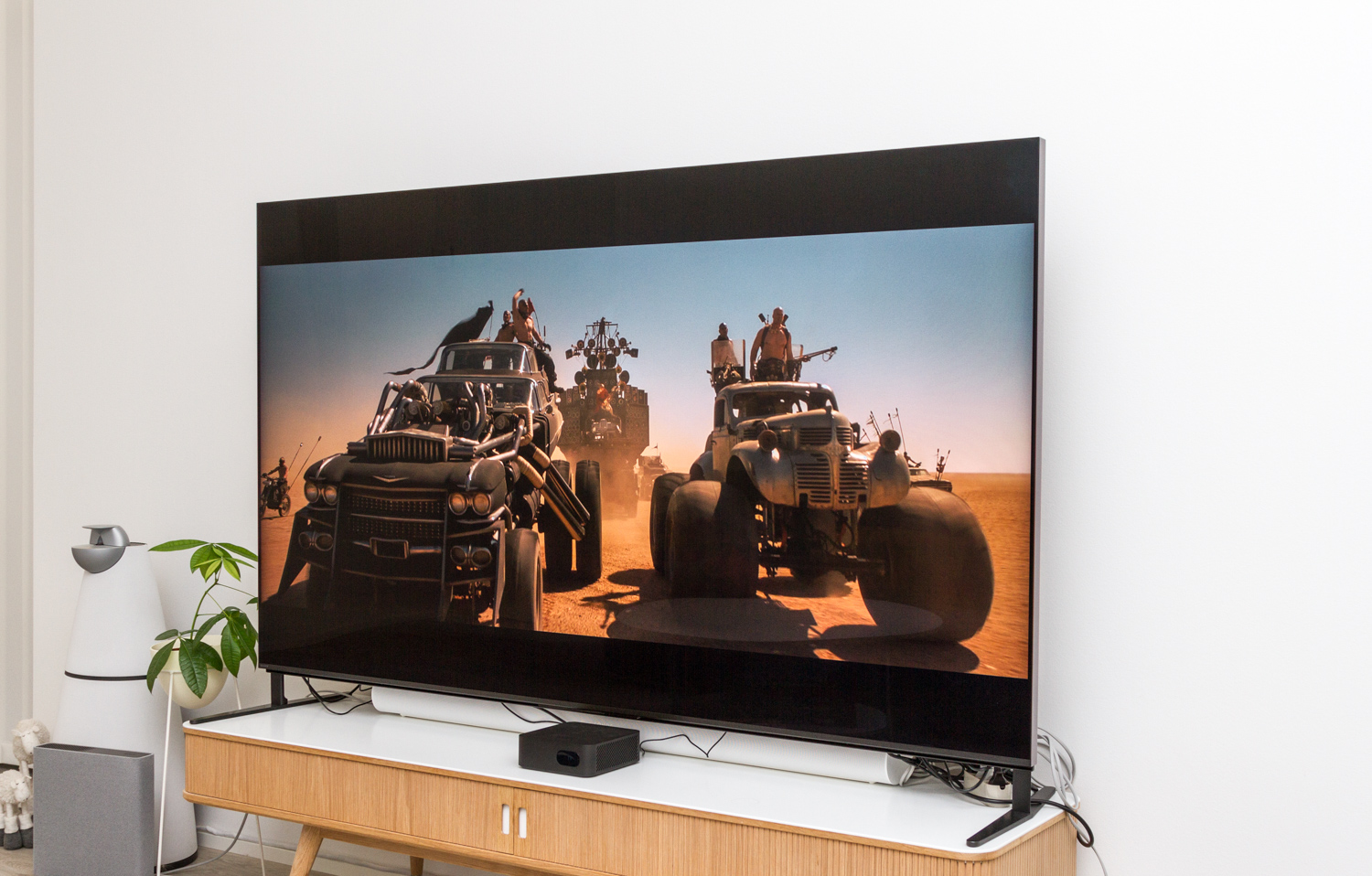
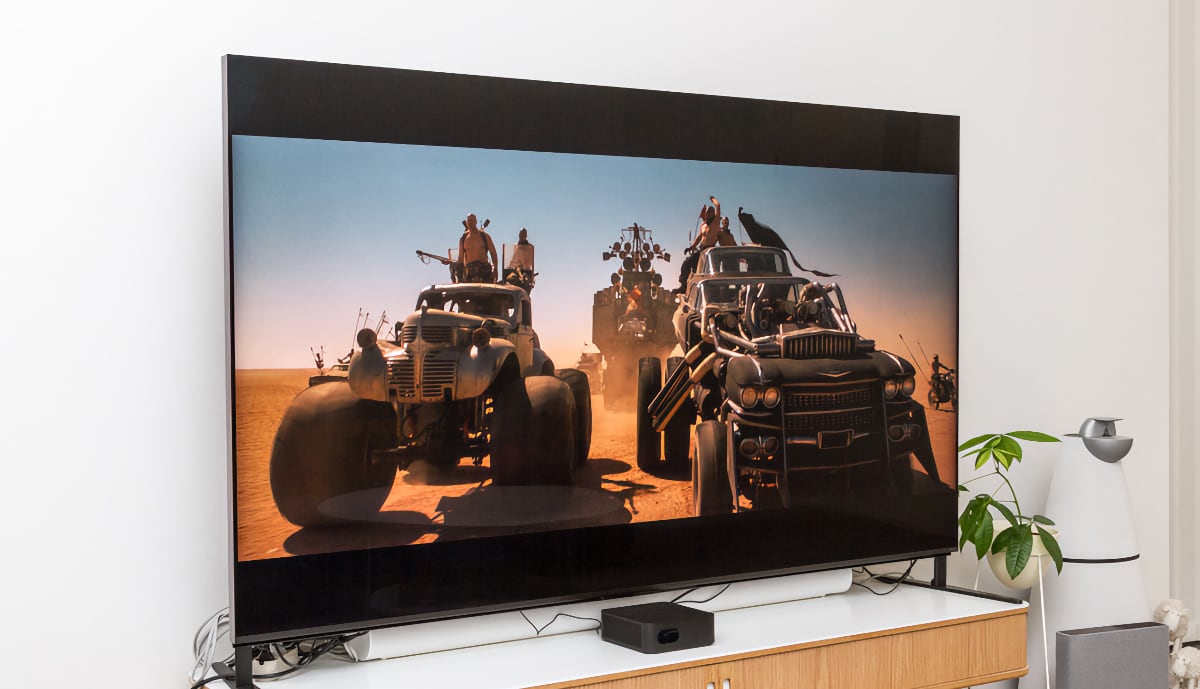
At launch, XR90 was not available in sizes smaller than 75 inches in Europe, and the 75-inch TV is a full 10 inches larger than what I usually manage to fit on my TV bench. It takes about 19 seconds to get used to having those extra 10 inches, and from that point on, the only fear is having to downsize when the testing period ends. A larger TV combined with the addition of miniLED also means a higher price, and since Sony is generally priced a bit higher than its Korean competitors, XR90 is unlikely to be a TV for everyone. XR90 looks elegant, featuring a simple metal edge around the frame, a reasonably slim border from the active screen area to the TV frame, and Sony's traditional flat back panel with a subtle pattern for a design effect. This is not a paper-thin OLED TV, but considering the technology and size, the TV still appears sleek. All of the connections are located on the left side of the TV, positioned far enough out to be accessible if the TV is wall-mounted. It is worth noting that of the four HDMI ports, only two are HDMI 2.1, but one of these is also the HDMI eARC port, so you lose one HDMI 2.1 as soon as you connect an external sound system. During our test, we had the new Sony Theatre Quad sound system connected, which also utilizes the TV's ability to act as a center channel in a surround setup. With one HDMI 2.1 port taken up by the Theatre Quad, you will have to choose which other device can benefits from VRR and 4K120 support. In our test the port was dedicated to a PlayStation 5. On back of the TV, we also find two clips at the top for securing Sony's Bravia Cam, something we also saw on X95L and X95K. The camera is not included in the box, but based on experiences with A95, it is not a something we will miss. Its functionality was, at best, a gimmick. One feature we did not get to test when we had the camera together with Sony's A95L was the ability to tune picture and sound so that the camera detects your position and dynamically adjusts the soundscape and, somehow, adjusts the picture to match where you are seated relative to the screen. This is a feature we have yet to test, even on XR90, as the camera is required for it to work. On the back, we also found an exclusive XR90, namely the addition of Dolby Atmos up-firing speakers, meaning that XR90 now has front-, side-, and up-firing units, along with two woofer units to enhance the Atmos experience. Panasonic's 2000 series has also featured up-firing units since a few years back, and as Dolby Atmos content becomes more widely available, these extra speakers are becoming increasingly relevant.The feet on XR90 offer multiple placement options: width-wise, they can be positioned either centrally or all the way out at the corners, and height-wise, they have two positions, allowing for a soundbar to be tucked under the TV or for the TV to sit flush with the stand. In our test, we had the TV positioned high with the feet at the sides so our Sonos Arc could also be tested with the TV via HDMI eARC. It is a simple system but works excellently and offers more flexibility than what you get with a centrally placed stand. If wall-mounting the TV, you should double-check the weight capacity of the wall bracket and especially the wall itself, as Bravia 9 is a heavy TV at 42 kilograms without the stand.
User experience & features
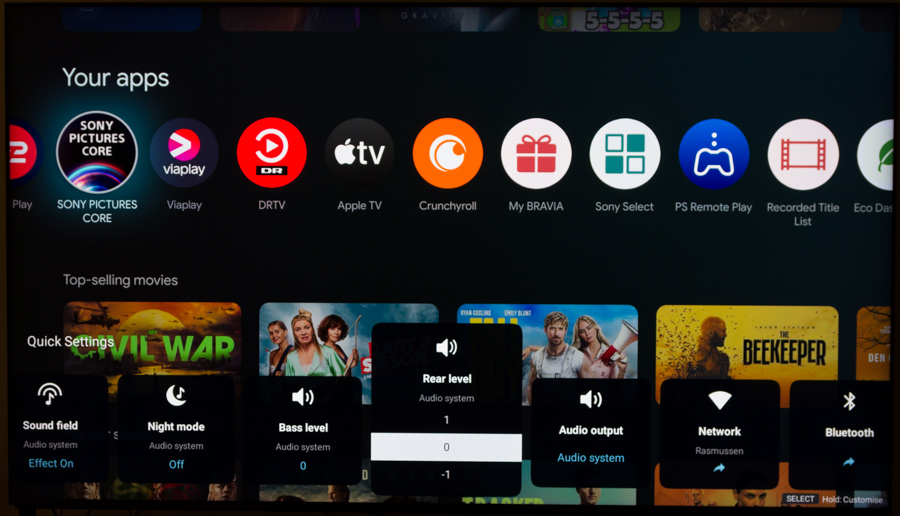
Sony has not upgraded the MediaTek chipset since we last looked at A95L, so it is still the Pentonic 1000 chip (MT5897) powering XR90. Similarly, it XR90 still runs Android 12 underneath Google TV, which is the user interface on top, so there is not much new to report when it comes to user experience and the general speed of the TV. For a more detailed examination of Google TV 12 on a Sony TV, read our Sony A95L review. We noticed that interface struggles to keep up at times, leading to occasional lag and stuttering during navigation when menus are accessed too quickly. Here is how the CPU and GPU compares:If we are to run through some of the many features, Google TV offers access to almost all the popular streaming services, and both Google Cast and AirPlay 2 are built into the TV as 'fallback' options. Sony's own Sony Pictures Core (formerly Bravia Core) service gives you access to 10 movies (not newly released titles) when buying XR90, and more movies can be purchased through the service. Considering the available selection, it is hard to see Sony Pictures Core as a serious contender in the market, but the free movies and the very high video streaming quality that is more or less matches UHD Blu-ray may attract some. With the exception of the newest releases on the platform, most titles are available on other platforms as well. Sony Pictures Core is no longer exclusive to Bravia TVs, as you can also find the service on Playstation, however without the very high video streaming quality (Pure stream).Google TV – CPU/GPU benchmark
CPU – Geekbench 4 (single-core & multi-core) MediaTek MT5887
Philips OLED805MediaTek MT5889
TCL C845 X1MediaTek Pentonic 700
TCL C805, X955MediaTek MT5895
Sony XH90, X90J, X90K, X90L, Philips OLED807MediaTek Pentonic 1000
Philips OLED809MediaTek Pentonic 1000
Sony A95L, XR90Nvidia Shield TV Apple A10X
Apple TV 4K 1st GenFlatpanelsHD
GPU – GFXBench (1080p Manhattan 3.1 & Aztec Ruins), 3D Mark (Slingshot Extreme) MediaTek MT5887
Philips OLED805MediaTek MT5889
TCL C845 X1MediaTek Pentonic 700
TCL C805, X955MediaTek MT5895
Sony XH90, X90J, X90K, X90L, Philips OLED807MediaTek Pentonic 1000
Philips OLED809MediaTek Pentonic 1000
Sony A95L, XR90Nvidia Shield TV Apple A10X
Apple TV 4K 1st GenSony's Eco Dashboard gives you access to information such as estimated power consumption and shortcuts to Eco settings to save energy, which typically means that brightness is either dynamically adjusted to the surroundings or lowered overall. With Sony's camera, the TV can also turn off entirely if the room is empty, but this is a feature we have yet to test since the camera, as mentioned, is not included with XR90. The Eco Dashboard and power consumption tracking are mainly useful for reviewing past usage since the measurement cannot be displayed in real time during use. You can see the current power consumption, but it is not an estimate for high-brightness HDR movies, so the figure is not necessarily representative. As seen in our measurement table further down, a 75-inch zone-controlled LED consumes a good amount of power, with average power consumption during HDR watching at nearly 300 watts. This is the same power per area that we saw on TCL X955 Max but twice as high as Sony's own QD-OLED model, A95L. Naturally, it is worth noting that XR90 reaches significantly higher brightness levels across the board, so this is not a 1:1 comparison. For several generations now, Sony has concentrated on improving audio quality in TVs, introducing systems such as Acoustic Surface in OLED models. On the LCD side, Sony introduced side-facing speaker units a few years ago – a feature also found in Panasonic's 2000 series. This year, Sony has taken a page from Panasonic's book by adding up-firing units, but in a more discreet implementation. Unless you are specifically aware of it, you will hardly notice the presence of the up-firing Dolby Atmos units in XR90. The top and side channels are virtually invisible, save for a few grooves on the back. This design choice is partly due to the fact that the TV is not styled to appear slimmer at the top, which is a common characteristic of many OLED models.
Setting up the audio involves some setup requiring the user to define how the TV is mounted (wall or stand) and then conducting a room calibration with the microphone in the remote control. The process is quick and provides some fine-tuning of the sound profile relative to the room you are in. If you have the camera for the TV, it is said to be able to track your movements and adjust the audio to where you are sitting in relation to the TV. The sound in XR90 is actually quite respectable. Dialog is clear, but the treble can become a bit harsh even at moderately high volume. The very deep, rumbling bass is absent, even though there are two bass units present, which is expected, but compared to entry-level soundbars, XR90 is not entirely outperformed. Switching to Dolby Atmos soundtracks, it is particularly the side-firing sound that helps expand the soundstage in the room. The top-firing channels are much easier to pinpoint relative to the TV and do not deliver much overhead sound, but it is still very evident that sound fills the room significantly more than with, for example, Sony's Acoustic Surface in the OLED TVs or the less capable LCD TV models. Most of the action is still centered in front of the TV, but instead of being confined to a narrow cone right in front of the screen, there is considerable width to the soundstage. We had the opportunity to test the TV alongside Sony's Theatre Quad system, which is their successor to the HT-A9 system that we reviewed last year, and here you have the option to use the TV as a center channel. Since XR90 is more powerful than, for example, A95K/L, it makes much more sense to use XR90 as the center channel than it did when the system was tested with A95. In this combination, letting the TV join in added a lot to the sound experience, even though Theatre Quad is quite capable of generating a so-called “phantom center" on its own. To use the center channel feature, it must be enabled in the sound menu and the TV must be connected to an analog output on Theatre, so it can control the speaker volume directly, bypassing the TV. This ensures that the TV's volume is matched with the external speakers. During testing, there were unfortunately multiple instances where Theatre did not power up together with the TV, so you had to manually select 'External audio' through the bottom menu on the TV. This is a bug I often encounter when testing TVs with soundbars, and unfortunately, Sony has been the most affected in my tests. It is not a major issue since you can reactivate the speaker system with a few clicks, but it is a small annoyance nonetheless.Sony changed the design of its remote control a few years ago, making it significantly more streamlined and minimalist by removing the numeric buttons, among other buttons. I would have preferred if the six sponsored apps at the bottom were replaced with programmable buttons, allowing me to decide which apps I want. Unfortunately, XR90 does not come with the metal version of the remote but rather a model made from recycled plastic. The batteries in the remote are now rechargeable through a USB-C port to the bottom. The remote is too lightweight but otherwise it is decent enough for daily use with good tactile feedback in buttons. A fun gimmick we have mentioned before is the 'find remote' feature, which can be activated on the TV via the Power button. When activated, the remote emits a loud tone for 2 minutes to alert you to its location.
Calibration
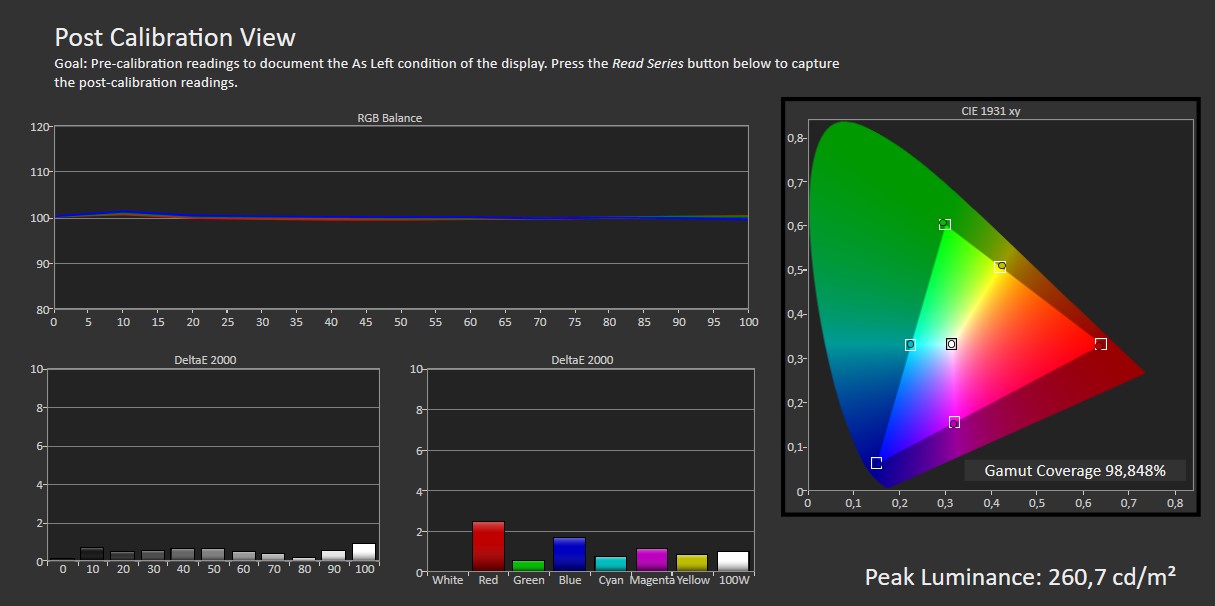
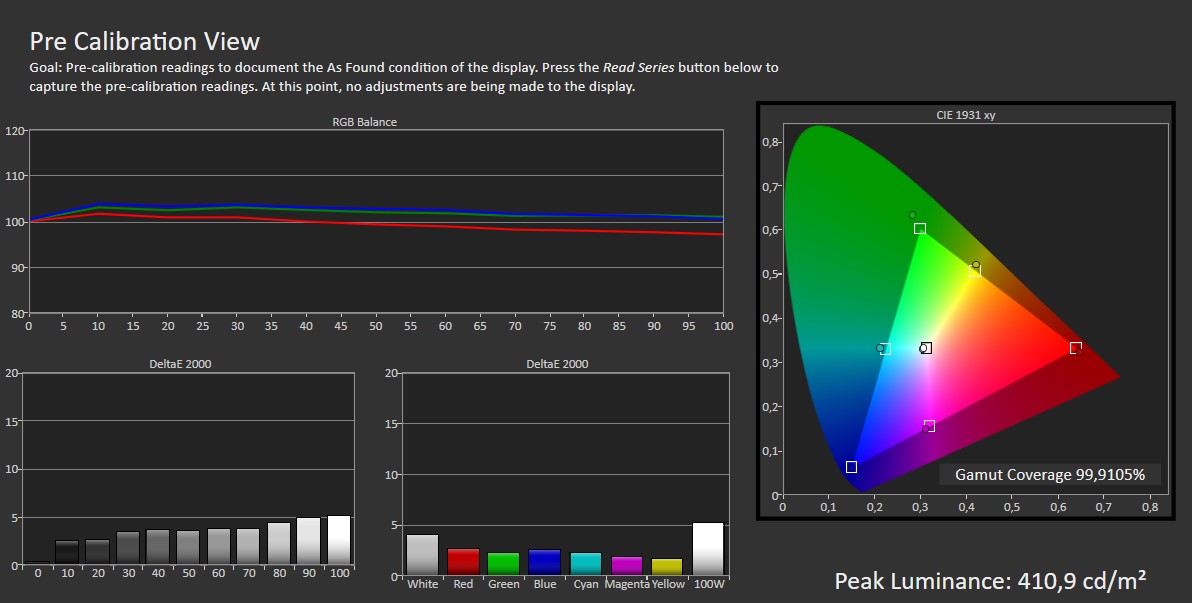
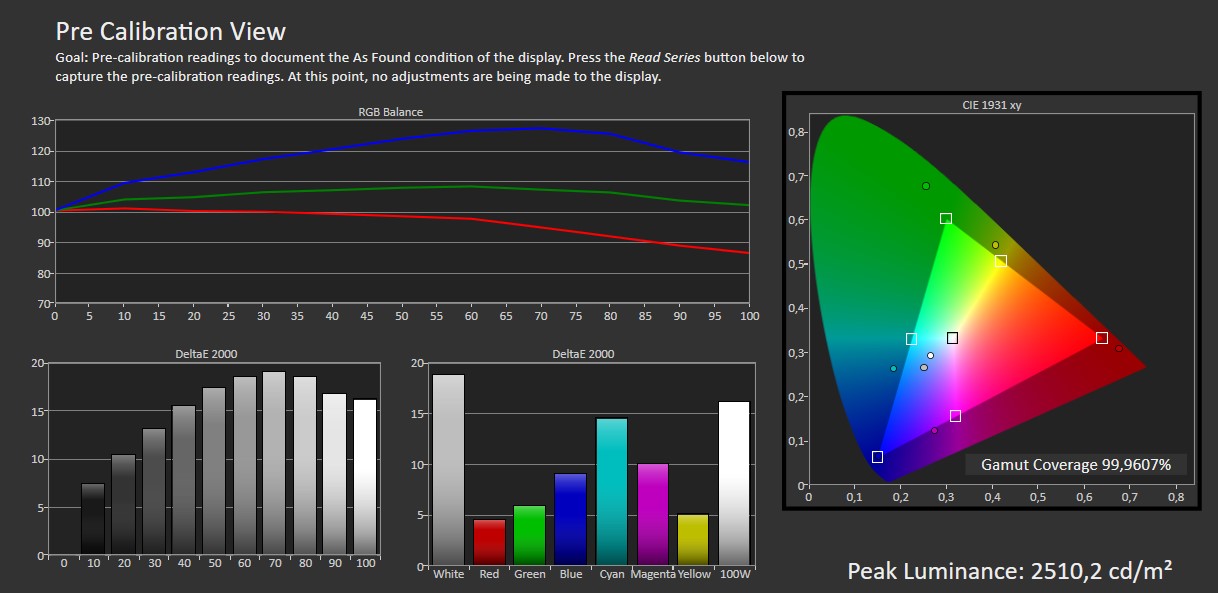
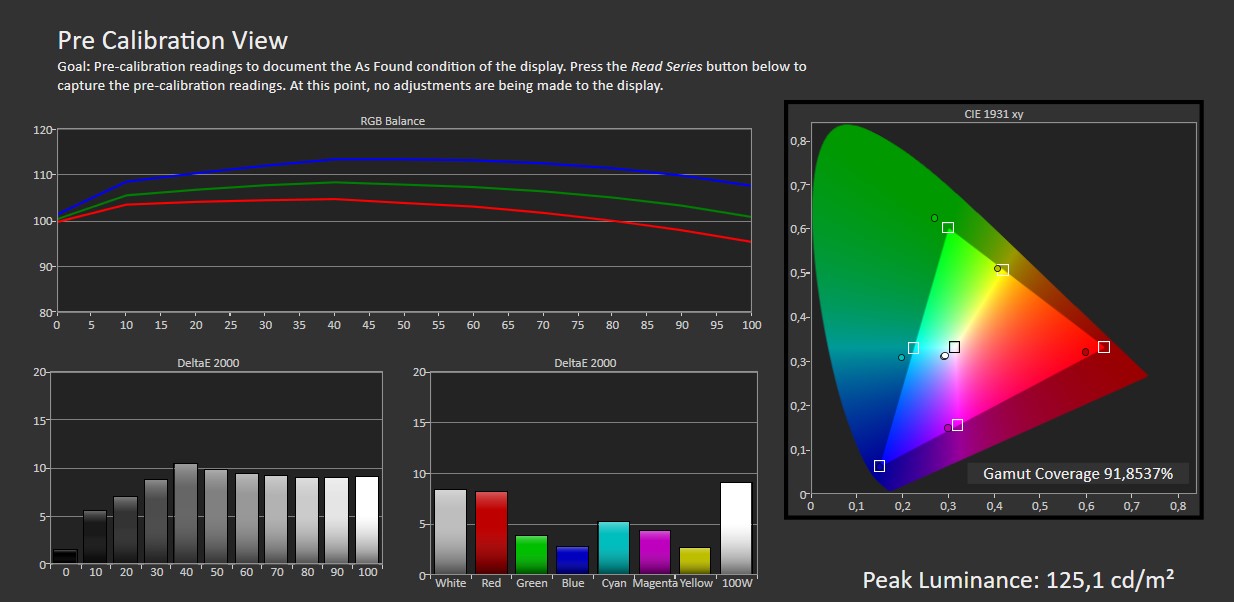
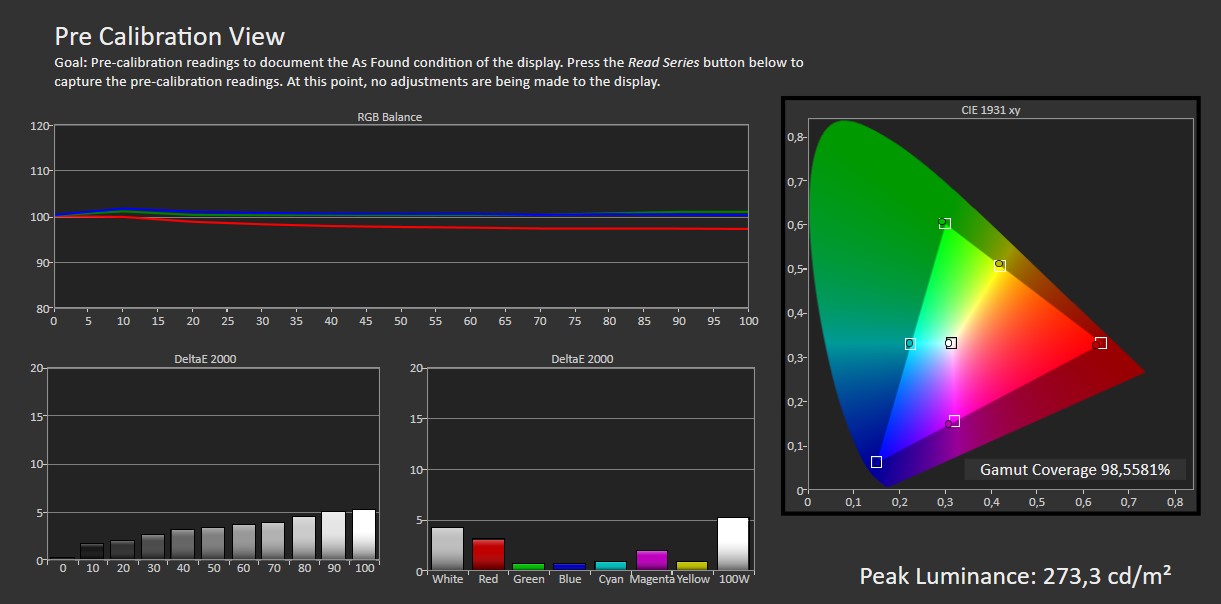
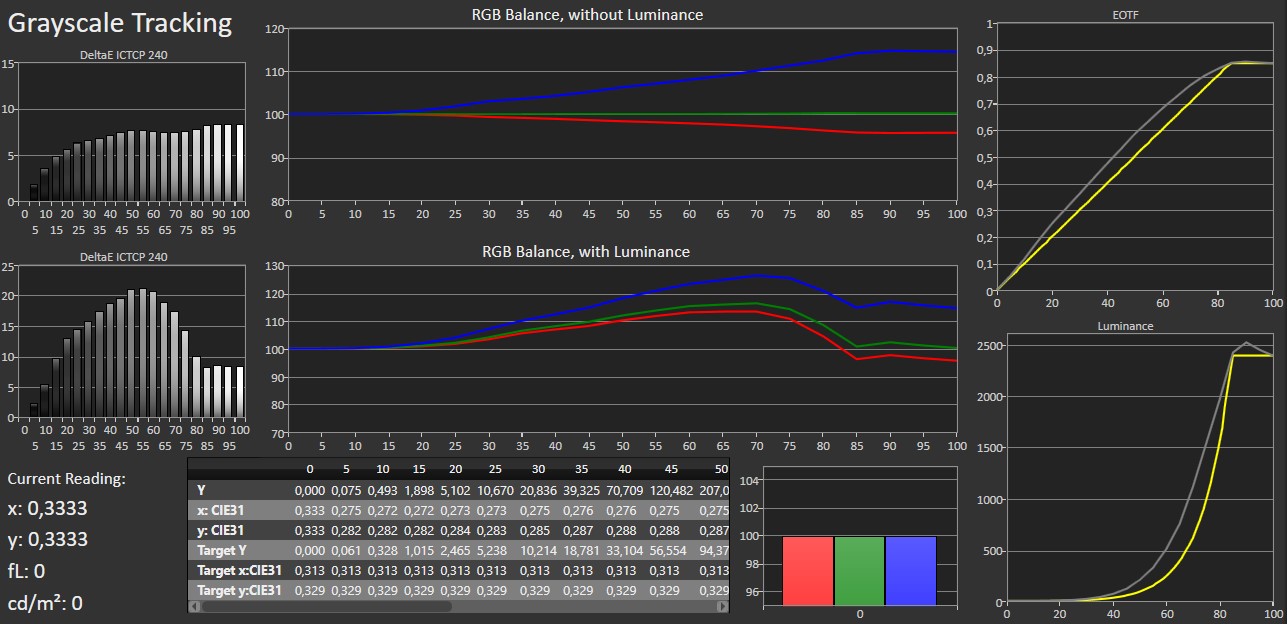
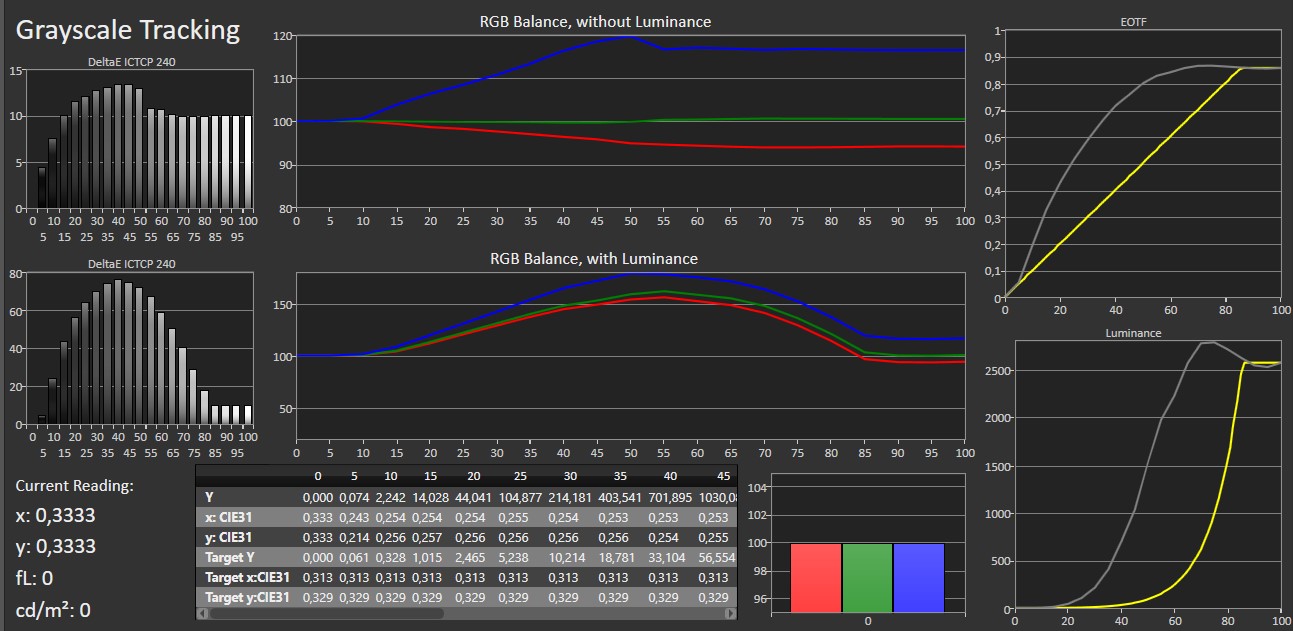
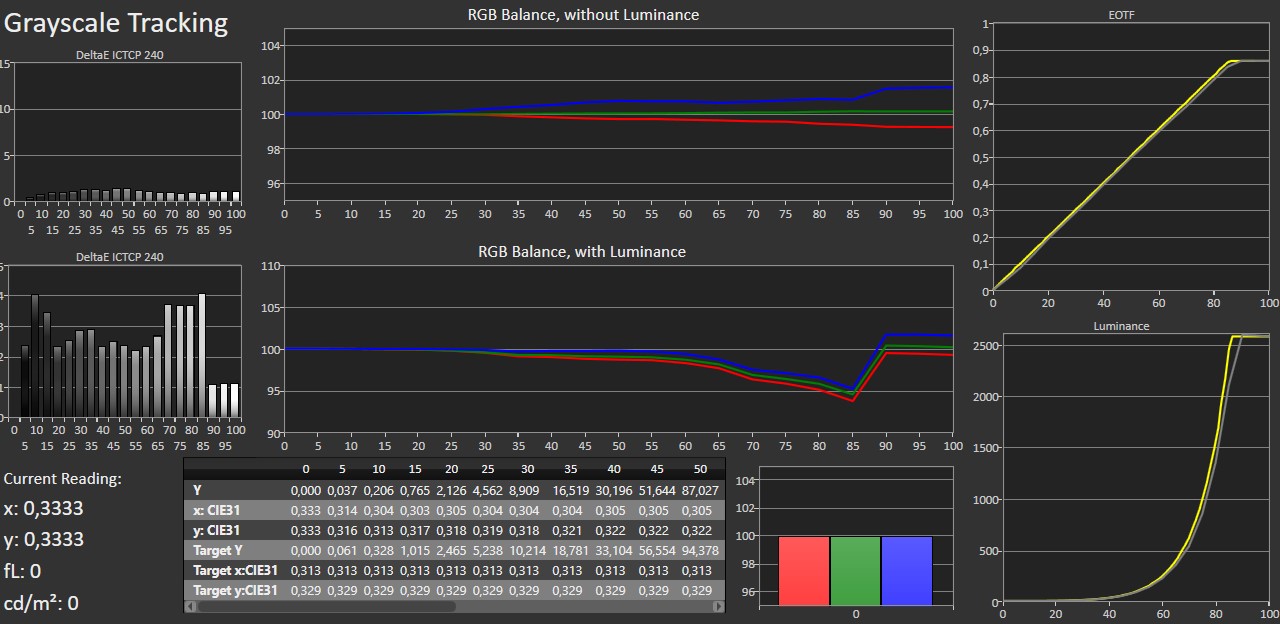
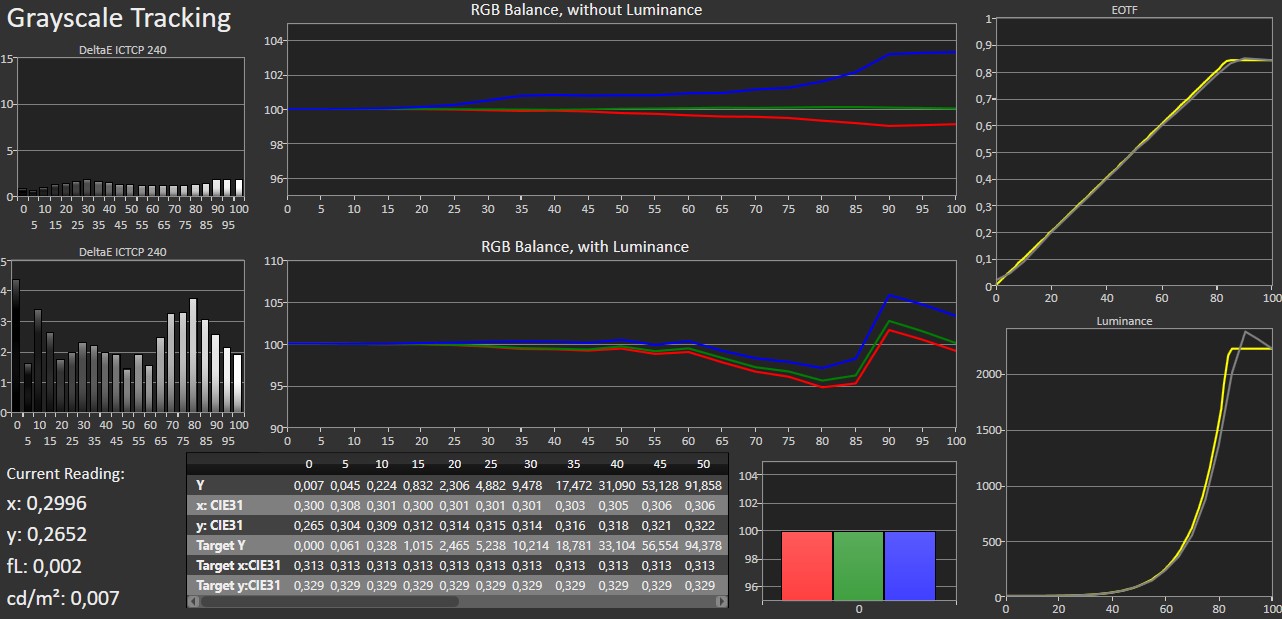
There are quite a few picture modes to choose from with Sony, and they can all be configured for movies or games. With game mode enabled, you can also select which type of game you want to optimize for, and you now get access to Sony's gamebar with quick access to various gaming-related functions and tweaks. In our opinion, there are still far too many picture modes to choose from, and that has not changed since last year. Sony added the 'Calm' picture mode last year, but like most other picture modes, it should simply be ignored. Instead, you should pick either IMAX or Professional. Both deliver roughly the same color accuracy out of the box and can be calibrated to the same very accurate picture, however it is necessary to fine-tune them to reach the intended result – both in terms of brightness and motion. On Sony OLED TV, you can typically adjust the RGB balance in highlights, and the shadow details will fall into place. However, on this LED LCD model, XR90, you also need to significantly reduce the blue primary color in the dark end. The precision can be tuned almost as finely as you want, and there is direct access to raise or lower gamma (in both SDR and HDR) if you want to make the picture appear overall brighter or darker. This can be a matter of preference depending on mainly the room you intend to use the TV in. Brighter rooms might call for a higher gamma. In this test, we calibrated to BT.1886, which is slightly darker than gamma 2.2, and if you have a very bright room, you might want to bump this setting up two notches (so that it is set to 0). Calibrating in SDR creates a separate color profile, which does not necessarily follow the picture mode. It means you can carry over your adjustments to other profiles picture modes both SDR and HDR. However, other picture settings in SDR and HDR, as well as in Dolby Vision (separate picture models), need to be adjusted. If you have had a chance to try a QD-OLED TV, you will notice that colors on XR90 do not quite compare. QD-OLED simply covers a larger portion of the HDR color space BT.2020 than what quantum dot LCDs can achieve, and the colors on QD-OLED are more naturally saturated. On the other hand, XR90 can reach higher peak brightness levels than OLED, and as for full-screen brightness (100% window) XR90 surpasses the 1% peak brightness of my own AF9 OLED TV. With HDR content, you often get more than 2000 nits peaks. If you switch to Vivid model (which you shouldn't), peak brightness is around 400 nits higher, as long as we are talking smaller picture areas. It is worth mentioning that it is a little difficult to reach a very low brightness level around 100 nits on Sony XR90, as it requires turning the backlight almost all the way down.Other picture modes
Click the title to expand the view
Standard (SDR) Cinema (SDR) Vivid (SDR) Calm (SDR) Professional (SDR) Photo (SDR) Standard (HDR) Vivid (HDR) Professional (HDR) Cinema (HDR) Game (in Professional) (HDR) Measurements
In our "measurements" section we include all measurements and our suggested calibration settings. If you want to learn more about our test methodology click here. Note: Starting last year, we implemented a new method for measurement of average power consumption in SDR and HDR, meaning that earlier measurements are not 1:1 comparable. The new method will be used in all TV reviews going forward.Note: We include calibration settings only for SDR, not HDR. For our calibration we have deactivated the ambient light sensor that automatically adjusts the backlight setting according to your environment. You may prefer to have it enabled.Picture quality
Bravia 9, or XR90, is Sony's most advanced LCD model to date. After our visit to Sony earlier this year, we discussed the differences between previous models and XR90, including technical details on the upgraded miniLED zone dimming system. Last year's X95L model reached just over 700 zones, and while Sony never comments on the exact number XR90 is close to 2000 zones in the 75" model and just under 3000 in the 85". Determining the exact control mechanism of these zones is challenging without disassembling the LCD panel, but our hypothesis is that each dimming zone consists of 4 diodes. These four diodes do not allow for the same level of local light control but do provide limited PWM light control. For a more in-depth look at the light panel, check out our article from earlier this year. Our estimate of 1920 zones (with 4 diodes each) represents a significant improvement over previous Sony models but still far from matching OLED, where each subpixel functions as an individual diode. As a result, some 'halos' or blooming are expected around bright objects, especially when those objects are small relative to the zone size or move between zones. These glowing halos typically become prominent when the brightly lit objects on the screen are too small relative to the physical size of a zone or when the objects move between zones. This is also noticeable at the edges between the picture and black bars in movies shot in non-16:9 formats. On TCL's X955, we counted almost 20,000 zones, which minimizes blooming more effectively, although it remains visible, particularly off-axis. On Sony XR90, the control of dimming zones is exemplary, and we observed significant halos in only a few scenes with actual film material. However, as with any LCD TV, the effects of viewing angles become more apparent the further you sit off-center. Sitting far to the side reveals the dimming zones more clearly. Viewing angles remain one of the main limitations of LCD TVs. If you need to watch from various positions, it may be worth considering other options. Sony has included its latest X-Wide Angle technology in XR90 to improve viewing angles, but the inherent design of LCD panels makes it nearly impossible to achieve the same wide angles as OLED technology.After the first week with XR90, I sometimes almost forgot that it was an LCD with zone dimming. The miniLED backlight control was so balanced that many of the sudden, point-like washouts in colors and black levels seen in earlier generations did not occur on XR90. However, in a few scenes with very bright elements, the TV did boost overall brightness, noticeable due to a brief split-second delay. This did not initially seem like an issue with the subtle modulation of the backlight but rather as if the TV’s video processor was thrown off by the content's composition. Another tell was that the two lines of subtitles had different brightness levels. Despite this quirk, XR90 stands out as one of the most well-rounded LCDs in terms of local dimming. Its peak brightness of 2400 nits in a 10% window is among the highest we have measured in calibrated picture mode. As shown in the measurement section, the highest peak brightness occurs at 10%, while smaller bright elements (below 10% of the screen area) do not reach the same peak brightness level; a way to prevent haloing. Larger than 10%, the miniLED backlight scales down to manage power consumption. This means that very small bright objects will not actually surpass the peak brightness of the brightest OLED TVs, such as LG G4 and Samsung S95D. On the other hand, XR90 can sustain an exceptionally high brightness – over 650 nits – even in a 100% (fullscreen) window. This gives XR90 an advantage over OLED, with brightness levels that are twice as high as those of Samsung's S95D QD-OLED. It is important to note, though, that VA LCD panels have a native contrast ratio of around 5000:1, so areas near the illuminated elements, where the LEDs cannot be fully turned off, will not appear as deep black as on OLED. When the TV reaches 2400 nits, nearby black details rise to about 0.5 nits, resulting in a dark gray rather than true black. XR90 attempts to balance light output to minimize halos without sacrificing brightness – this is where the dimming algorithm comes into play. 2400 nits is a lot, but it does not meet the level of HDR brightness that Sony recently set as its new target value: 4000 nits. With enough brightness to give you a mild sunburn – joking, of course – the trade-off is power consumption, as mentioned earlier. In terms of power per screen area, the consumption is comparable to the TCL X955 (miniLED LCD), but it is less efficient than QD-OLED panels. Our average power measurement in HDR was just below 300 W, which is high – but given the TV's size, it was expected. Like WOLED, much of the light is lost in the color filters, leading to higher consumption, or in other words worse energy efficiency. Sony's local dimming system can be adjusted to different levels (Auto Local Dimming), but it is best to use the top two settings to get full advantage of the many dimming zones. There is some variation in how the rest of the picture behaves in the different settings, and lower settings result in lower effective contrast. At the lowest setting (Off), the image quality drops significantly, resembling an outdated IPS LCD panel with washed-out colors and noticeable backlight bleed. On the highest setting, highlights might appear a bit more muted in some scenes compared to the second-highest, but this is a trade-off between contrast, brightness and halos, with the highest setting offering the best overall performance. As noted in the calibration section, one area where LCD panels (and WOLED) lag behind our current reference T, Sony's A95L QD-OLED, is color saturation. WOLED panels lose some high-brightness color saturation in HDR due to the added white subpixel, while LCDs struggle with color due to their use of color filters. The miniLEDs in LCD TVs can achieve high brightness without relying on extra white light, but the color filters used to produce the colors are not as efficient as the quantum dots found in Samsung's QD-OLED panels, which Sony also uses. As a result, XR90 does not match the broader BT.2020 color space coverage of QD-OLED, nor does it produce the same intense and deep colors as our reference TV when HDR content is graded with colors at the edges of the DCI-P3 color space or beyond. Sony's video engine excels at handling motion and processing content of less-than-ideal quality. However, the XR90’s handling of smooth gradients was not perfect, with some visible banding in certain scenes – something that was not observed in the recently tested Sony WOLED and QD-OLED models. You can adjust the 'Smooth gradation' setting to control how much gradients are smoothed, but increasing the setting also results in a loss of picture details. Motion handling is generally strong. If you enable Sony's MotionFlow system, XR90 tends to struggle the most when subtitles overlap with the image. This aspect has evolved over the years, and when comparing it to my older Sony A9F, the current algorithm seems slightly less effective in certain areas, like interpolation and smoothing around stationary text. You can still sharpen the picture during panning without introducing too much of a soap-opera effect. However, looking at the bigger perspective, the only real solution to motion issues in modern TVs is for Hollywood to adopt higher frame rates. Over the years, various LED backlighting techniques have been used in LCD TVs, and generally, the thinner the TV, the more issues arise with backlight uniformity. Direct backlighting with zone control usually improves backlight consistency, though not always. For the 75" XR90, some may be concerned about uniformity, but our test unit showed no blooming along the edges. A long-exposure photo of the darkest scenes revealed a slightly darker spot in the center of the panel. While one sample is not enough to draw broad conclusions, overall, our unit fell within an acceptable range for backlight uniformity.
In the gaming tests I conduct, the TVs are connected to a PlayStation 5 console, which is limited to 4K 120Hz. For PC gaming, XR90 is limited to 144Hz in VRR, which is slightly behind competitors that have started offering dual-mode 240Hz support at half resolution. This is only relevant for PC gaming, and whether it matters is up to you. The lowest input lag is achieved at 120Hz refresh (around 10 ms), while at 60Hz, we measured XR90 at around 18 ms, similar to Sony's other models but behind competitors like Samsung and LG, whose latest TVs can deliver less than 10 ms input lag at 60Hz.
Sony's gamebar allows users to tweak picture elements for an advantage in certain games, such as boosting light in shadow areas or adding a crosshair to the center of the screen. Since calibration of Sony's picture modes occurs in a given color space, it is easy to transfer picture settings to game mode, ensuring accurate colors while gaming. Most TVs today support ALLM for automatically switching into game mode whenever a game is detected and back to a movie picture mode afterwards, for example if you are using your console for video streaming (read here why this is a bad idea), and while Sony prefers to call this feature something on its TVs else, it is ALLM. Only two of the HDMI ports support 4K120/144, i.e HDMI 2.1 bandwidth. Overall, XR90 is a good gaming TV but in some areas Sony is a little behind the competition.
Conclusion
Bravia 9, or XR90, represents a significant upgrade in Sony's miniLED zone dimming, especially in the larger models, with a clear improvement in LCD picture quality over previous models. While it does not match the sheer number of dimming zones in TCL's X955, Sony's balanced local dimming system creates an experience where you sometimes might forget you are watching an LCD instead of an OLED. However, the dimming algorithm can occasionally falter, and viewing off-axis reveals the zone transitions very clearly.Ad:XR90 shares the same system chip and Android 12-based Google TV as the A95L QD-OLED, providing access to all major streaming services like AirPlay 2 and Google Cast, though without any major any major new features. In audio performance, XR90 offers a wide soundstage with up-firing speakers that actually do add a subtle Dolby Atmos effect. The remote control, however, is too basic and made from recycled plastic but now includes a USB-C rechargeable battery and a built-in microphone for room-specific audio calibration. If you are after Sony's excellent video processing and a large TV without the same high premium price of the significantly better A95L QD-OLED, XR90 is one of the best LCD TVs available today. If your viewing position is well-suited to LCD, Sony XR90 is definitely a model worth considering.Price and retailers:
US retailerUK retailer
DE retailerGood SDR and HDR picture w/ lots of brightness
Good motion system
Decent Dolby Atmos speakersMiniLED blooming
Viewing angles
Only two HDMI 2.1 ports