Review: Philips OLED810
OLED810 replaces last year's OLED809 and a long line of Philips 8-series OLED models, which are some of the most direct alternatives to LG's C-series OLED TVs. This year, it comes with a slightly brighter OLED panel and a more advanced video processor, 3-sided Ambilight, and still Google TV – now running Android 14. Philips OLED810 is available in sizes from 42 to 77 inches. We have tested the 65-inch model. Also read: Philips 2025 TV line-up (with TV compare tool)Price and retailers:
UK retailer
DE retailerFirst impressions
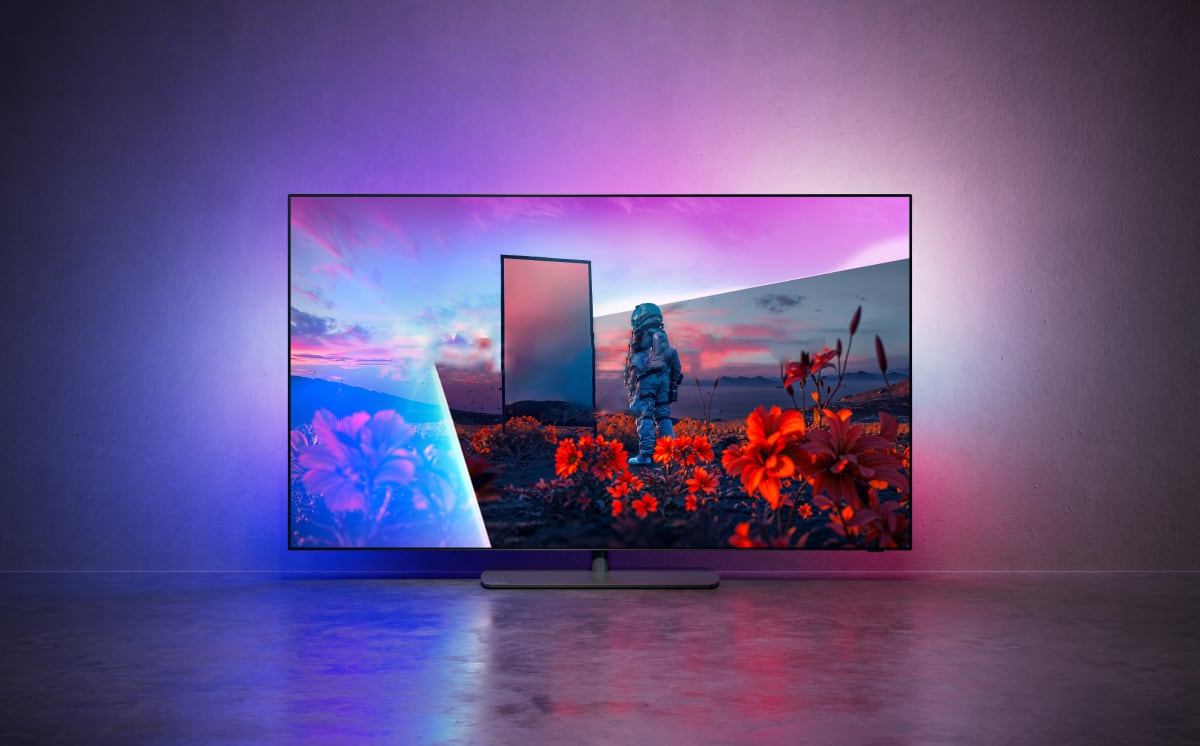
Overall, OLED810 looks a lot like its predecessors, but the centrally mounted metal stand has been changed to an oval shape. The metal stand is solid, providing a stable base for the TV, and it can still be manually swiveled to either side. The OLED panel is very slim, but the familiar electronics box remains on the back, where the power cable and other connections are attached. Note that the 77-inch model has a different, two-part stand to better support the larger panel. The electronics box means that the TV will sit slightly away from the wall when wall-mounted, but unlike other manufacturers, where the goal is to keep the TV close to the wall, a Philips TV should have some space to allow Ambilight to project its ambient light onto the wall. OLED810 features 3-sided Ambilight, projecting light above and to both sides. For 4-sided Ambilight, you need to move up to Philips' 9-series, which are also the only ones with the new 4-layer RGB Tandem OLED panel. On the back, all relevant ports are present, including four HDMI ports, two of which support HDMI 2.1 bandwidth for 4K120. eARC is on HDMI2, so connecting a Dolby Atmos soundbar will use one HDMI 2.1 port, leaving you with only one for game consoles. Similarly, the Ethernet port is still limited to 100 Mbit/s – as is the case with all TV manufacturers. All ports face downward or sideways, except for the power socket, which comes with an angled power cable.User experience & features
Philips' 2025 Google TVs still use the MediaTek Pentonic 1000 chip (MT5896), like the two previous generations. This is the same chip used in, for example, Sony Google TVs, but this year Philips has more storage, approximately 17-18GB free after setup. OLED810 has 3GB of RAM and a Mali G57 GPU – unchanged from 2024. Another upgrade is that OLED810 comes with Android 14 preinstalled, as opposed to Android 12 last year. Google TVs we from other manufacturers that we have tested in 2025 are still running Android 12. Google has simplified the setup process, making it quicker to sign in with a Google account and get started, but this is offset by several additional setup steps from Philips. We rarely manage to complete the setup of a Google TV device using only the smartphone app, and with OLED810, we again had to finish the setup on the TV itself – a minor annoyance, though it only needs to be done once. As with all other Google TV devices, you can choose to set up the TV as a full Google TV or 'basic TV', which can be useful if you are using an external media player for streaming apps. Because OLED810 uses the same chip as last year's model, its performance is unchanged:Additionally, the Google TV section is more or less identical to last year's models, so we refer to our review of Philips OLED809 for a detailed overview. The same considerations apply to OLED810 and also to Philips' two new 9-series models, OLED910 and OLED950. Like last year, OLED810 has an additional 'Philips' tab at the top of the Google TV interface. It introduces Ambilight am provides access an NFT collection, manuals and tips. The tab could be used more effectively, as Philips has several interesting features that could be highlighted. Later this year, Philips will launch its Moment app, allowing users to select photo galleries via smartphone for display on the TV. We have not had the opportunity to test it, but read this article for more information. If there is one feature to highlight, it is Ambilight, which remains unique to Philips TVs, even though several alternatives have appeared over the years for other TV brands. Ambilight, however, is still the only integrated ambient lighting system in TVs and the most fully featured. On the remote control, there is an Ambilight button, giving quick access to switch between Ambilight modes. Instead of dynamic colors, you can have a fixed color (bias lighting), which can help reduce eye strain in dark viewing environments. Holding down the Ambilight button on the remote gives access to advanced settings, but you still need to navigate the normal menu structure (under Picture and Sound) to find the extended Ambilight features – this could be more streamlined. Here you will find Ambilight Lounge (Ambilight while the TV is off), Sleep (a function to help people fall asleep), and Sunrise (an Ambilight alarm clock). Ambilight can automatically adapt to the content, room lighting, compensate for the wall color, and adjust the bias light color. All of these make Ambilight significantly more user-adjustable than alternative solutions, which is why we recommend buying a Philips Ambilight TV if you want ambient or bias lighting. Our overall opinion of Google TV remains unchanged. The TV platform is the best integrated into a TV and now has virtually all relevant apps (the Xbox app is still missing), both international and local apps. However, the hardware lags behind Apple TV 4K and, to some extent, the aging Nvidia Shield box. This is unfortunate, as we believe there is still a very large untapped potential in Google TV as a platform. The platform is continuously updated, so new features appear during the TV's lifetime, but not to the same extent as Apple TV 4K, and the hardware will eventually impose natural limits on how extensively new features can run on Google TV. In our review of Philips OLED809 last year, we experienced issues with HDMI CEC (EasyLink). It improved with a firmware update but was not perfect. On this year's OLED810, everything – power on/off, volume control, input switching etc. – worked as expected. Philips has solved these issues, ensuring that you can control an external box with the Philips remote or the TV via a remote for an external box, such as Apple or Google devices. The TV has built-in WiFi 6 and Bluetooth 5.2. There are also two USB ports, but note that Philips no longer supports PVR functionality (record/pause).Google TV – CPU/GPU benchmark
CPU – Geekbench 4 (single-core & multi-core) MediaTek MT5887
Philips OLED805MediaTek MT5889
TCL C845 X1MediaTek Pentonic 700
TCL C855, C805, X955, C8KMediaTek MT5895
Sony XH90, X90J, X90K, X90L, Philips OLED807MediaTek Pentonic 1000
Philips OLED809, OLED810MediaTek Pentonic 1000
Sony A95L, XR90Nvidia Shield TV Apple A10X
Apple TV 4K 1st GenFlatpanelsHD
GPU – GFXBench (1080p Manhattan 3.1 & Aztec Ruins), 3D Mark (Slingshot Extreme) MediaTek MT5887
Philips OLED805MediaTek MT5889
TCL C845 X1MediaTek Pentonic 700
TCL C855, C805, X955, C8KMediaTek MT5895
Sony XH90, X90J, X90K, X90L, Philips OLED807MediaTek Pentonic 1000
Philips OLED809, OLED810MediaTek Pentonic 1000
Sony A95L, XR90Nvidia Shield TV Apple A10X
Apple TV 4K 1st GenOperation
The remote control is unchanged from 2024, which is fine, as it was already a significant upgrade from previous versions. The remote has a metal body and feels solid in hand. It is now rechargeable via USB, so you do not need to replace batteries. This works well in today's world, where USB charging is becoming a standard. Like last year, you can illuminate the 1-9 buttons in the directional area by pressing the '123' button. The number of buttons has been reduced compared to earlier models (thank you, Philips!), but in our opinion, there are still at least twice as many buttons as needed for the most intuitive operation. We would also like the 3 sponsored buttons at the bottom to be user-configurable. Google TV now has a 'magic' button at the system level, which can be set up for different functions directly in the interface, but for now, it is only on the remote for the Google TV Streamer box – not TVs with built-in Google TV. The fourth button at the bottom could ideally serve as such a 'magic' button. Currently, it only opens an overview of installed apps. Tip: A 'Button Remapper' app can be downloaded for free from the Google TV app store. It can change the function of certain buttons, although the printed logo on the button obviously does not change.The remote for Philips OLED810. Photo: FlatpanelsHDTV audio
The speakers in OLED810 have the same characteristics that we have come to associate with Philips. In other words, they perform better than average and provide some bass for movies and TV shows, helped along by a dedicated bass channel. For occasional TV viewing, the speakers will likely satisfy some viewers, but for full cinematic sound, separate speakers are needed. For music, we find the built-in speakers too confined – they lack clarity.Philips has supported both Dolby and DTS audio formats for several years. They continue to do so in 2025, and Philips remains the only TV maker that we have found to properly support DTS:X IMAX Enhanced – as offered by Disney+ for Marvel films. It also works with OLED810, where we confirmed that both DTS:X and DTS-HD MA are decoded. Also read: List: TV models with Dolby Atmos, DTS:X & IMAX Enhanced Dolby Atmos and DTS:X have limited impact when using the built-in speakers, but TV support ensures that the built-in apps can pass the audio to an AV receiver or soundbar system. Without built-in DTS:X IMAX Enhanced support, you would not be able to extract the audio from Disney+ and deliver it to your sound system, as external players like Apple TV 4K and Nvidia Shield do not support it. Dolby Atmos has wider support, but again, TV support ensures that Dolby Atmos (and DTS audio) can be forwarded through the TV's HDMI eARC. In other words, OLED810 has the audio tech embedded needed to get started with a decent home theater setup. Philips has not commented on plans to support the wireless audio platform Dolby Atmos FlexConnect.There is a bass port on the back of the TV. Photo: FlatpanelsHDCalibration
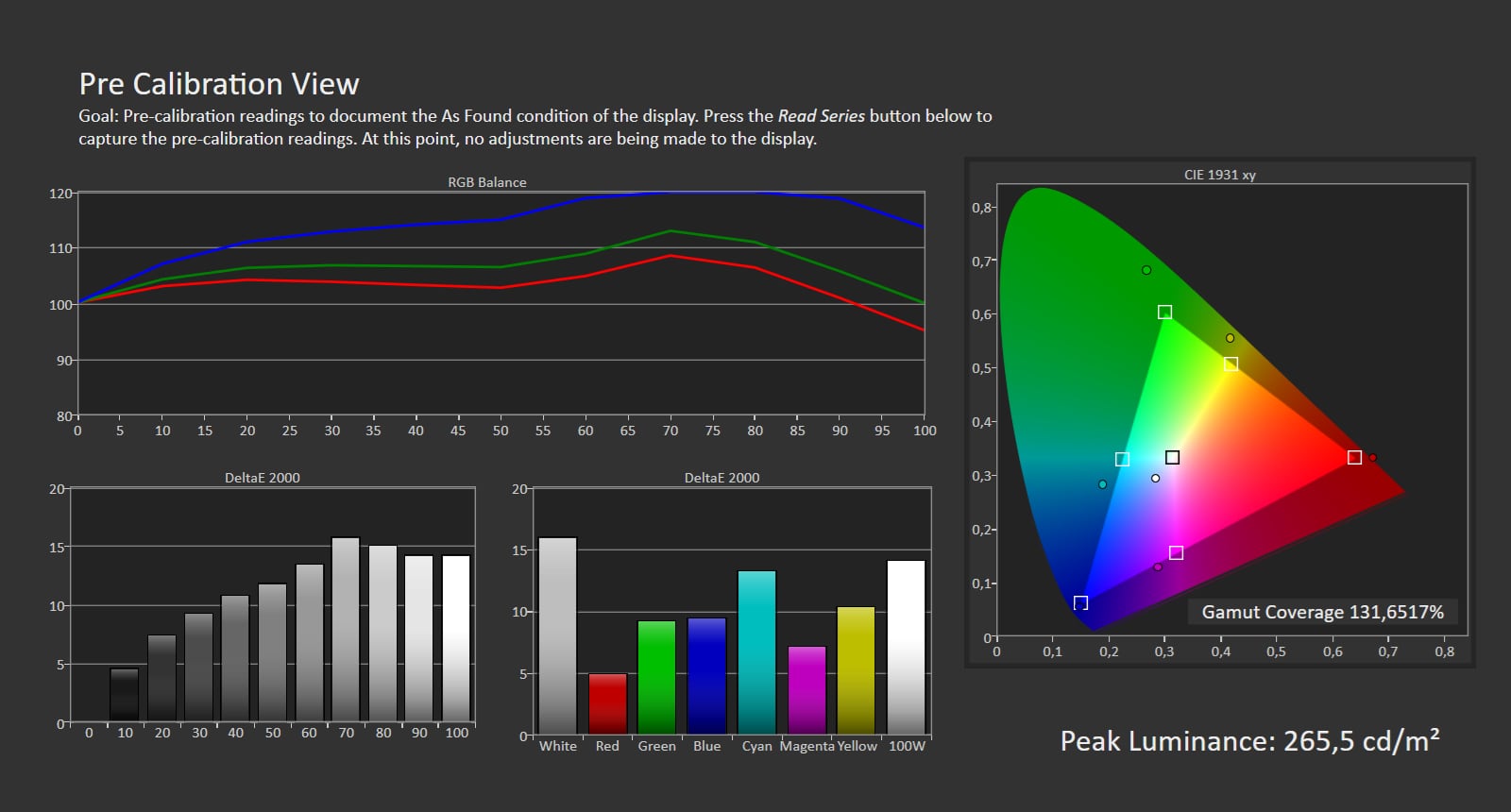
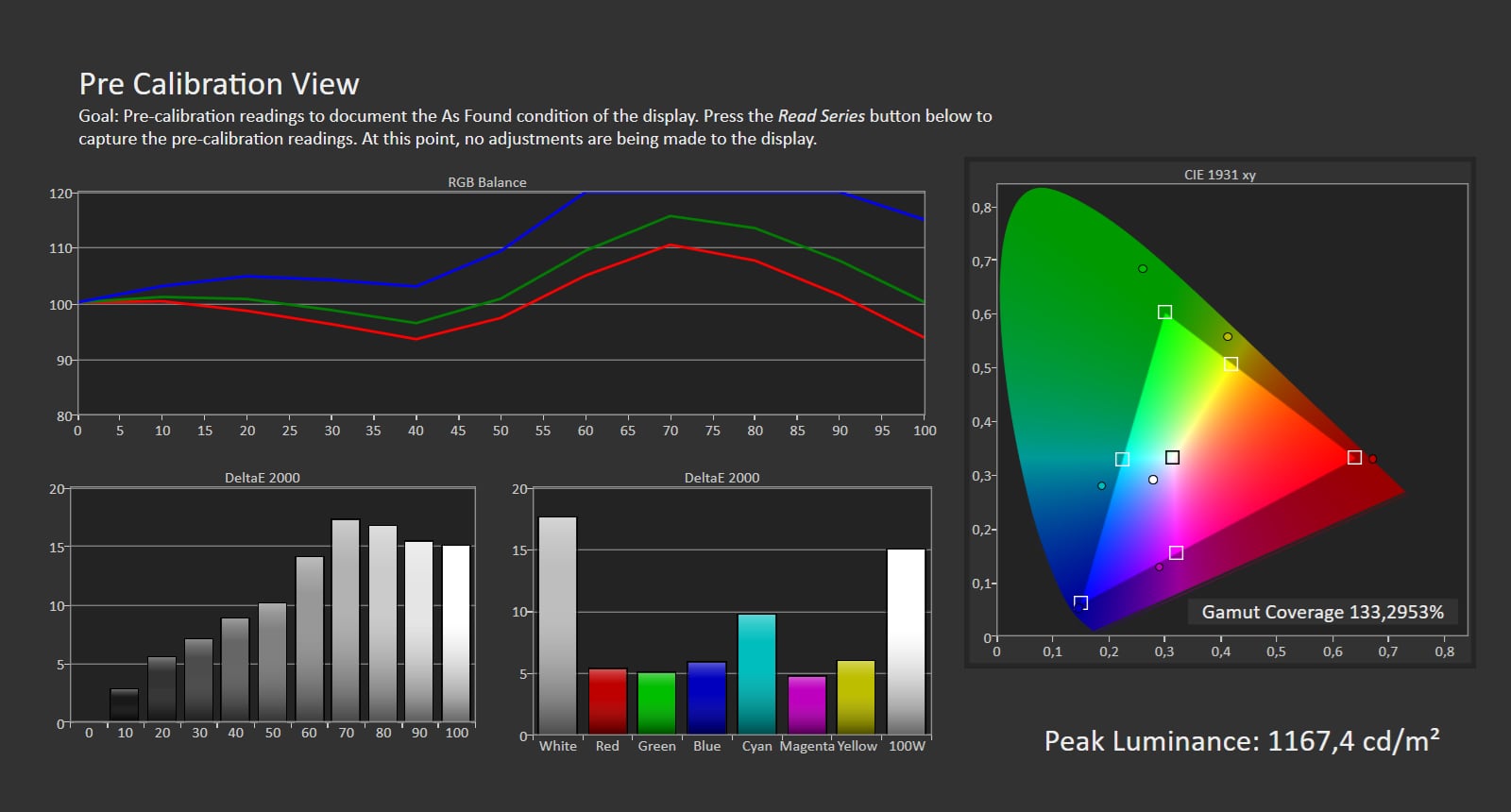
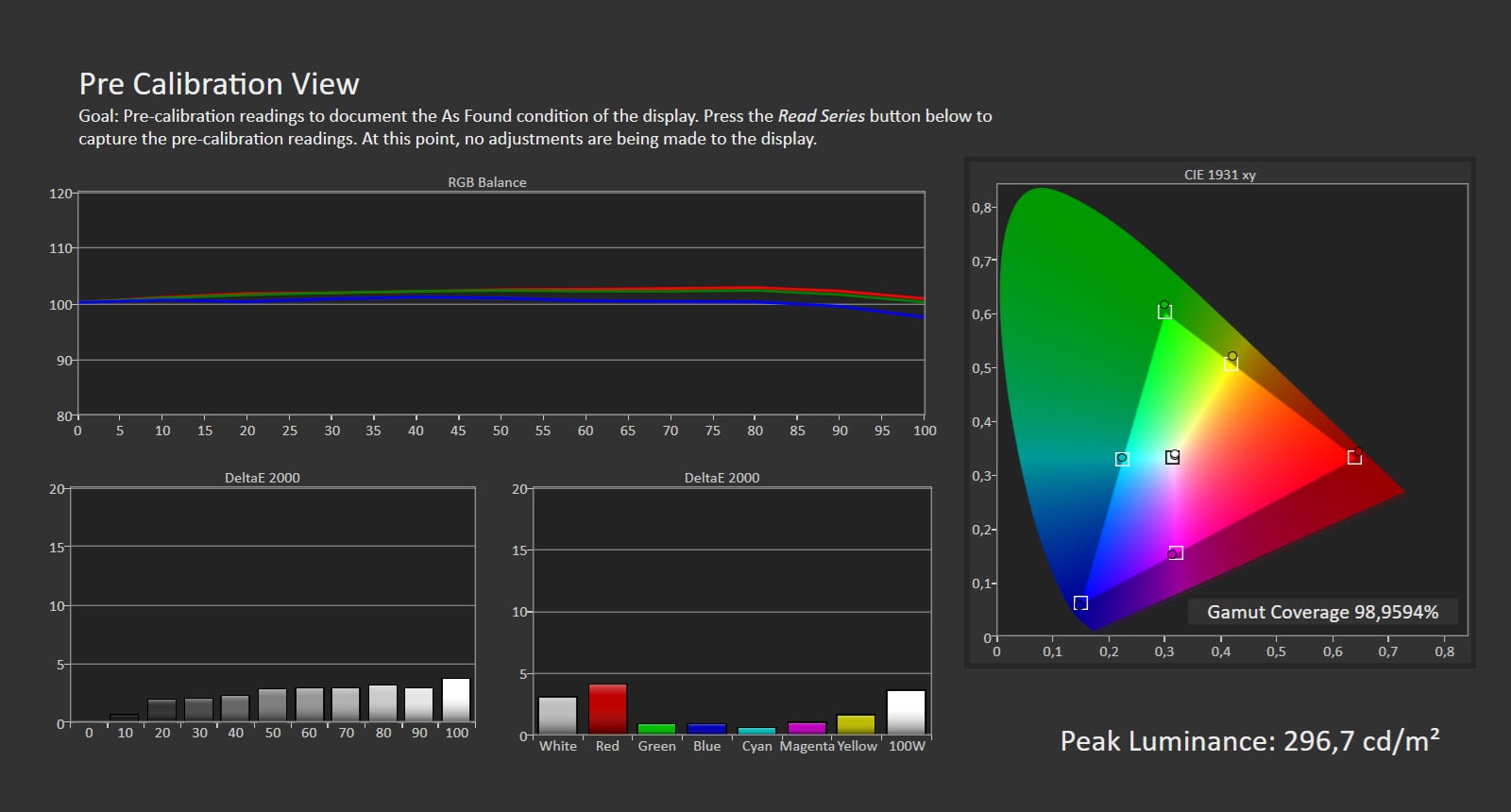
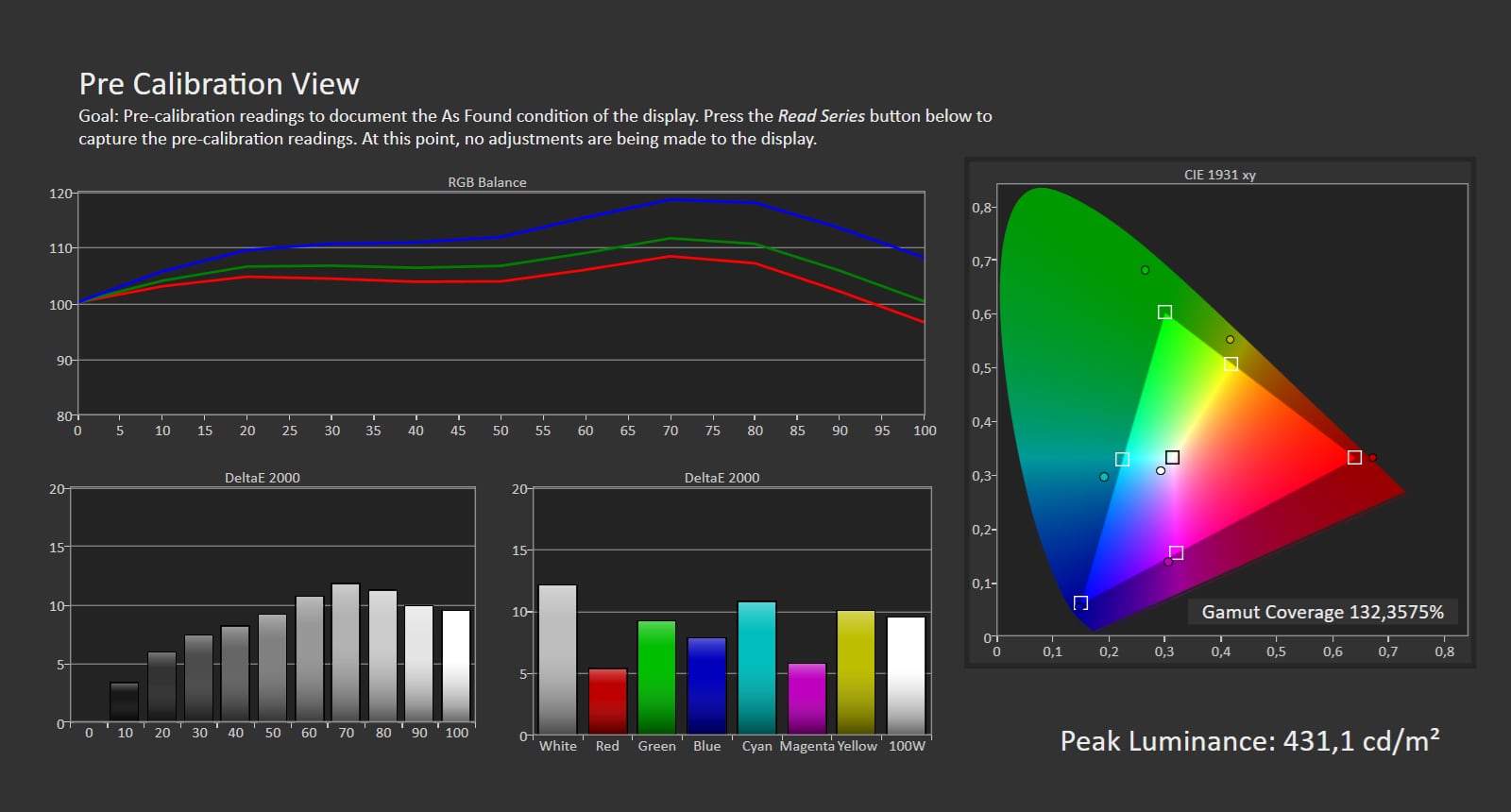
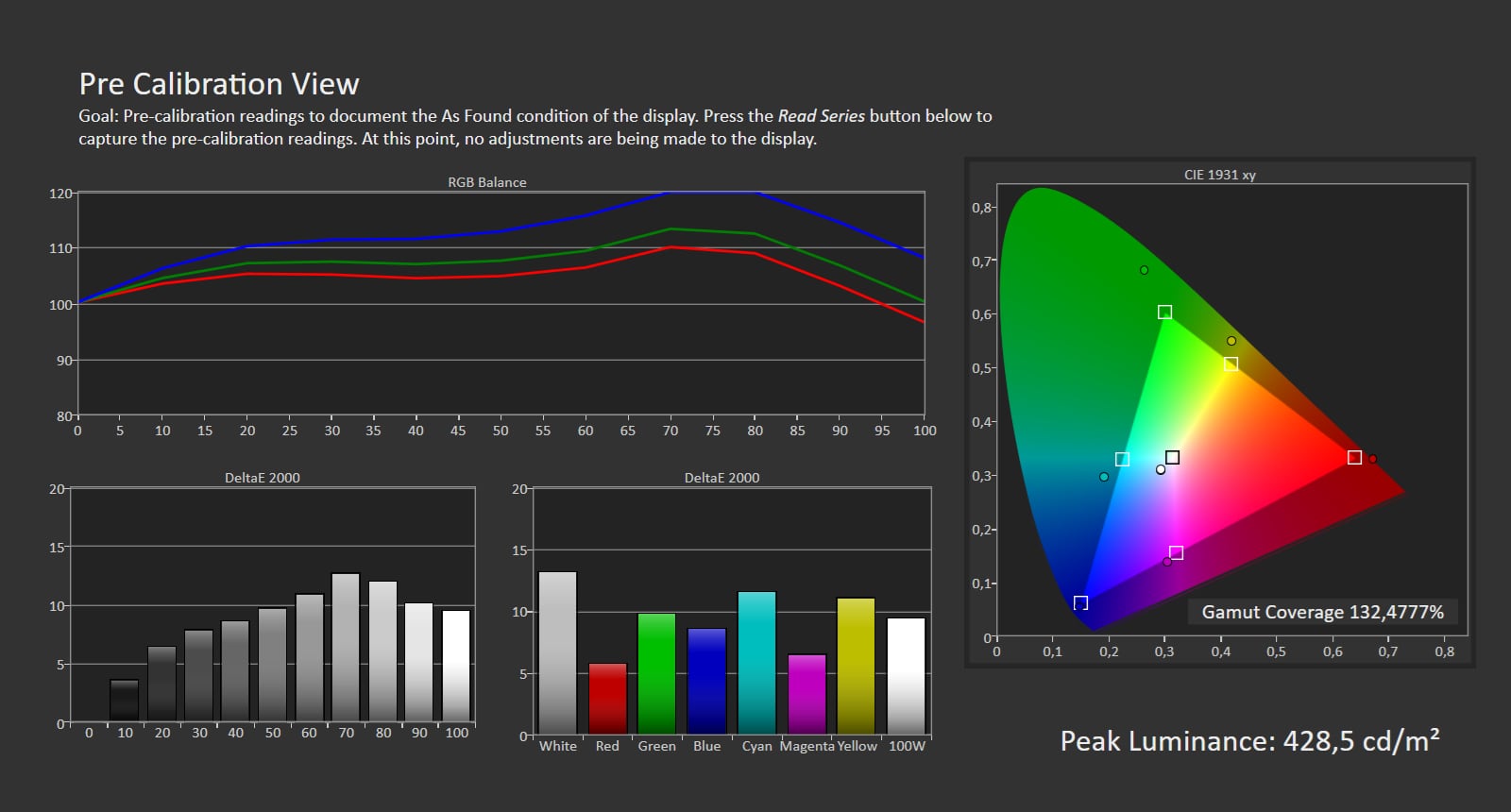
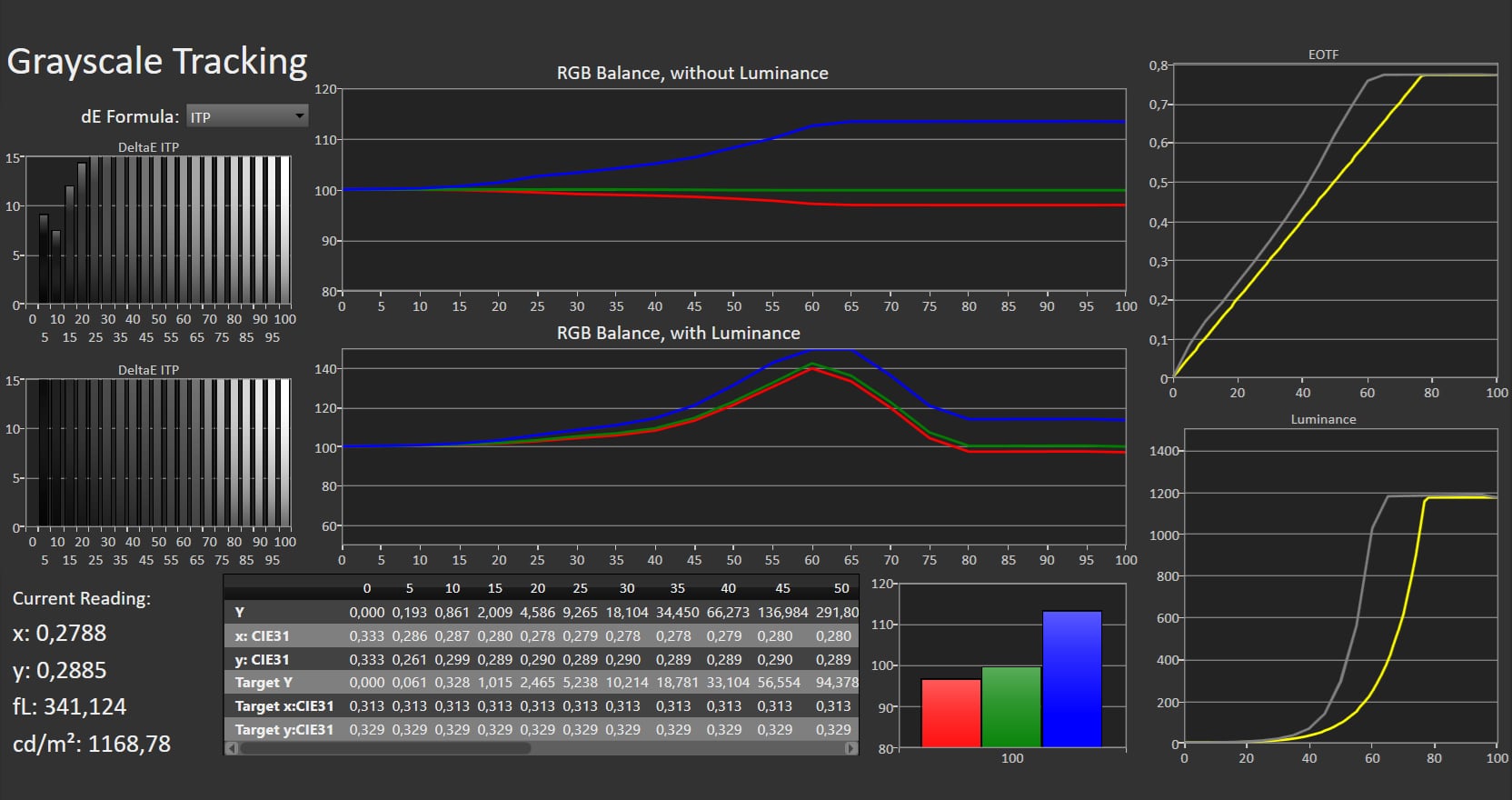
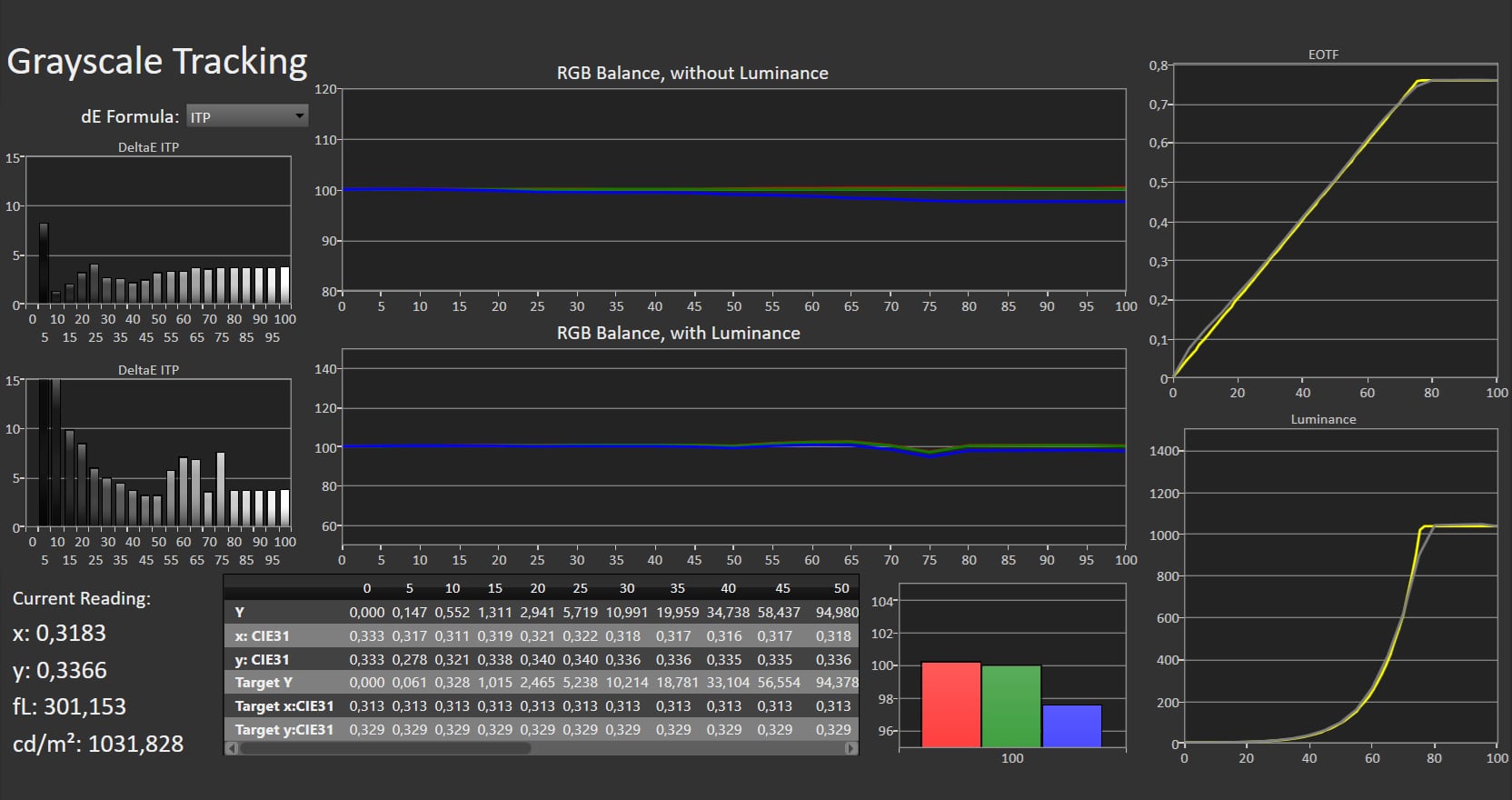
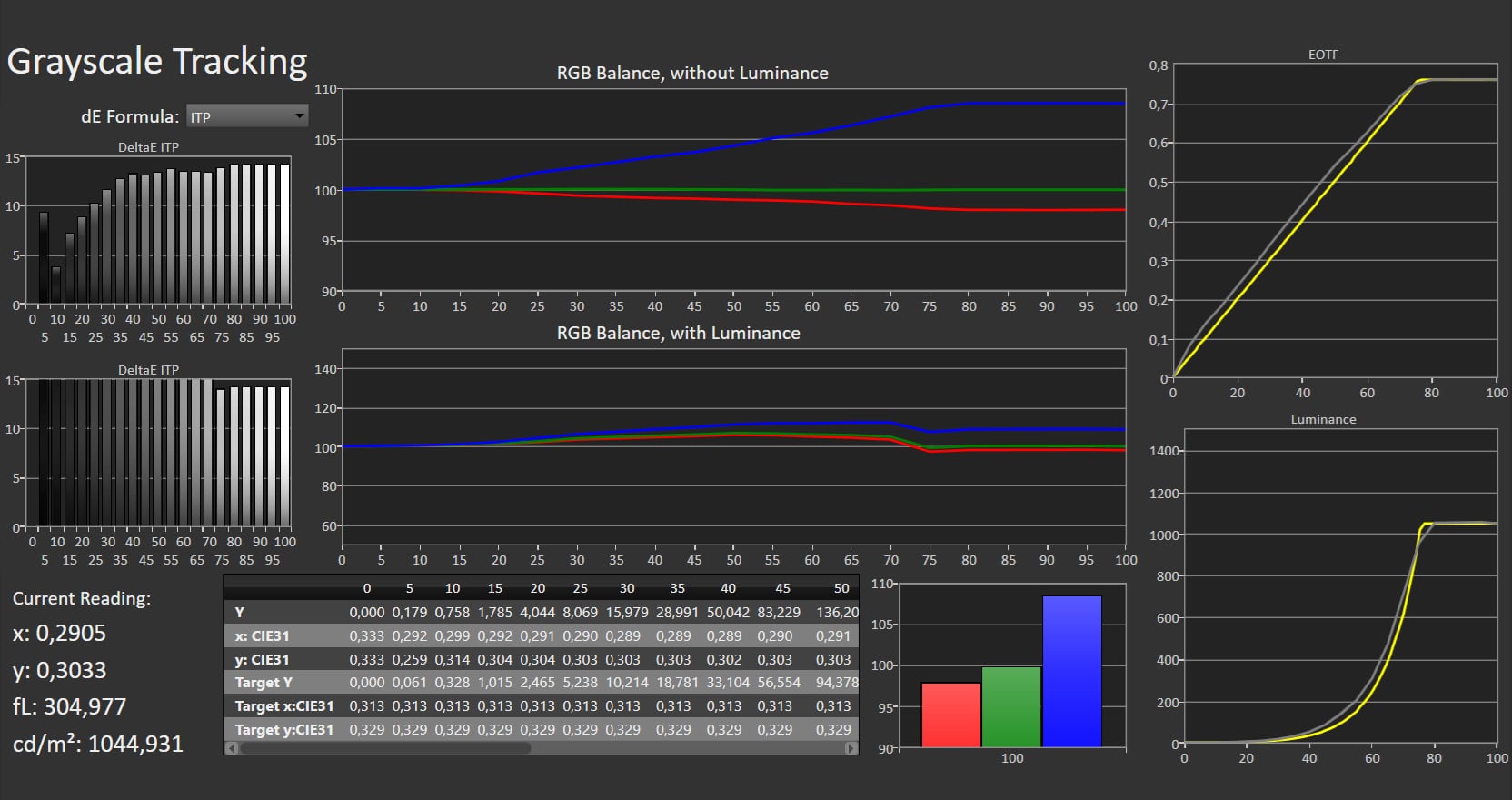
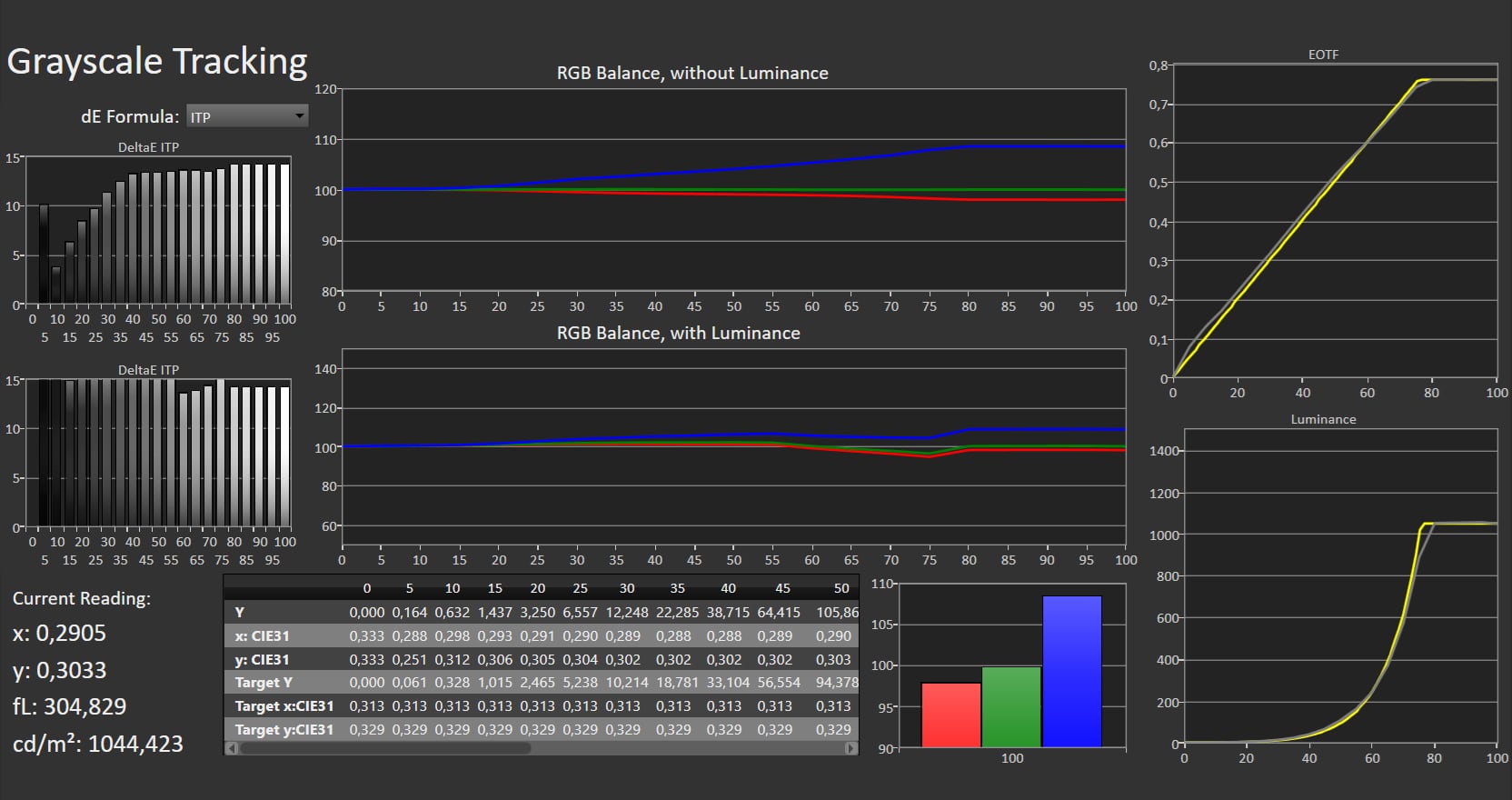
As always, there is a myriad of picture modes. By default, the TV is set to Eco picture mode to score high on the EU energy scale, but unfortunately not with the most accurate picture, while Crystal Clear is the most extreme. The most accurate mode, as usual, is Filmmaker Mode, even if you are not watching films or series. Filmmaker Mode deliver colors that closely match the input signal and is more accurate on OLED810 than last year's OLED809. The Game mode is less color-accurate than we had hoped, but not as extreme as on, for example, Samsung TVs. Disabling 'Gamut Optimizer' in the picture menu gets you slightly closer to accurate colors in Game mode. We again encourage Philips to reduce the number of picture mode. Starting with Filmmaker Mode, there is not much extra accuracy to extract, but a few small adjustments during our calibration still led to minor improvements. See the calibrated result below. However, there is still an issue: you cannot adjust the dark end of RGB (red, green, blue). The Offset setting (dark end) does not respond at all, which is a change from last year, when it erroneously controlled Gain (the bright end of RGB). We have observed similar issues on Google TV from other brands, so the error likely lies in Google's software. For HDR, Filmmaker Mode again has the most accurate colors. In Filmmaker Mode, OLED810 delivers up to 1300 nits peak brightness, higher than last year's OLED809 at 1100 nits, though the difference is modest in practice. In Game mode (HDR), peak brightness reaches 1050 nits. In Crystal Clear, which is somewhat bluer, it peaks to 1500 nits – the figure Philips cited earlier in the year as the maximum for the 2025 "standard" OLED panel, as opposed to the new, brighter 4-layer RGB Tandem OLED panels in this year's 9-series. It is good to see that the standard panel is also getting brighter. Full-screen brightness is up to 215 nits – unchanged from last year We also recommend Filmmaker Mode for Dolby Vision content. Remember that you need to switch picture mode for SDR HDR, and Dolby Vision; three times. Do it while playing content in the respective format. Color gamut coverage is the same as other TVs with the regular WOLED panel, approximately 99% DCI-P3 and 72% Rec.2020.Measured picture modes
Click the picture mode to expand the view
Eco (SDR) Crystal Clear (SDR) Filmmaker Mode (SDR) Home Cinema (SDR) Game (SDR) Eco (HDR) Crystal Clear (HDR) Filmmaker Mode (HDR) Home Cinema (HDR) Game (HDR) Left: Eco picture mode (SDR). Right: Calibrated (SDR). Photo: FlatpanelsHDMeasurements
In our "measurements" section we include all measurements and our suggested calibration settings. If you want to learn more about our test methodology click here. Note: In 2021, we implemented a new method for measurement of average power consumption in SDR and HDR, meaning that earlier measurements are not 1:1 comparable. The new method will be used in all TV reviews going forward.Note: We include calibration settings only for SDR, not HDR. For our calibration we have deactivated the ambient light sensor that automatically adjusts the backlight setting according to your environment. You may prefer to have it enabled.Picture quality
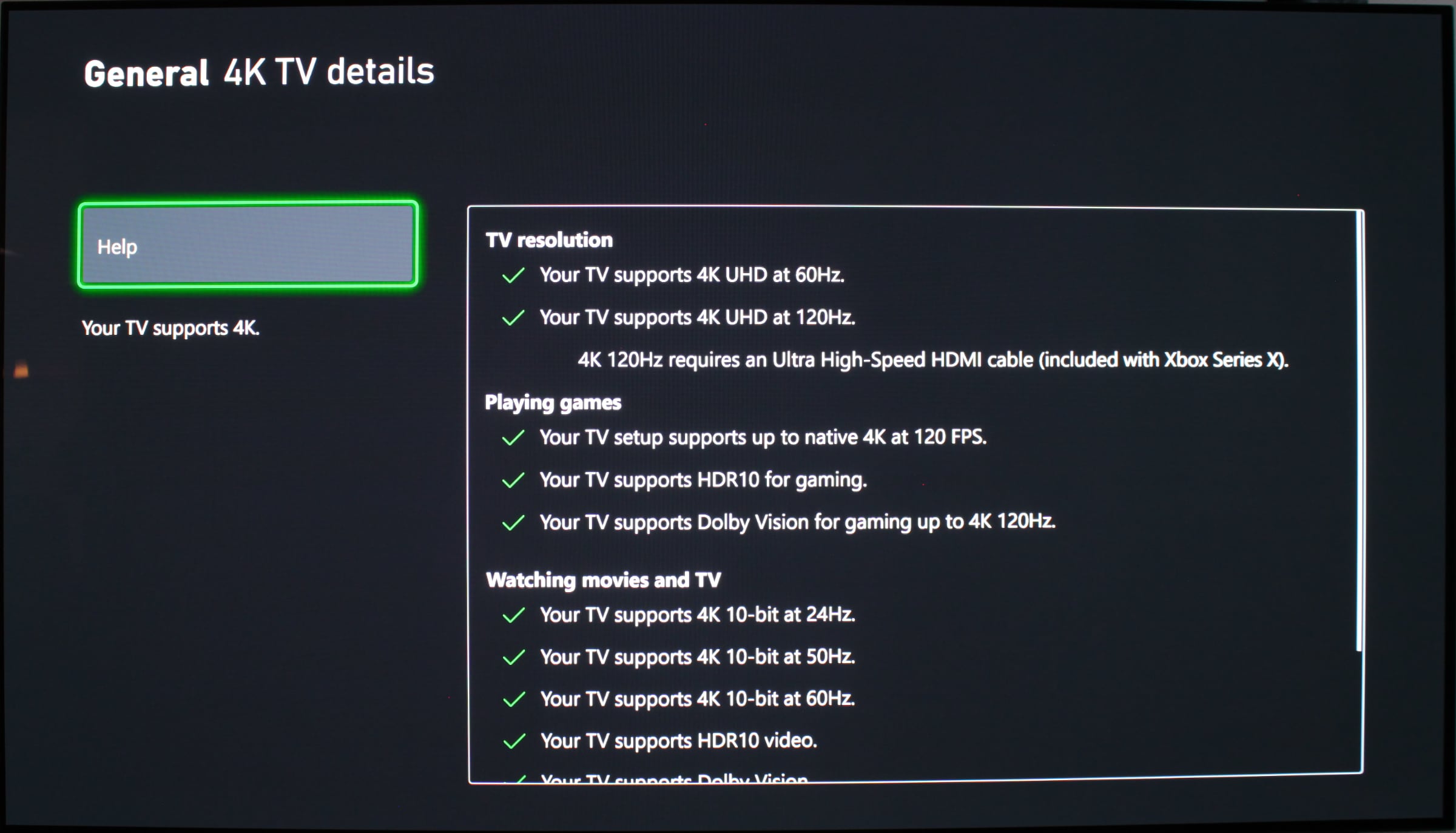
As the successor to last year's OLED809, OLED810 unsurprisingly shares many similarities. From a picture perspective, the biggest difference is that the 2025 panel is slightly brighter. Full-screen brightness measures roughly the same, around 200 nits, while peak brightness reaches about 1300 nits (compared to 1100 nits last year) with a calibrated picture and 1500 nits in a dynamic picture mode. In practice, the difference is very modest. Nevertheless, it is a significant improvement compared to models before 2024, when OLED TVs struggled to reach 1000 nits. As always with technology, the bar keeps moving: It is now RGB Tandem OLED (such as Philips OLED910) and QD-OLED that deliver the highest brightness for OLED. In practice, we saw excellent HDR performance, as most HDR content is still designed for a maximum of 1000 nits. OLED's pixel-level control of light and color ensures that content is reproduced as intended, very close to the reference, with deep contrast, perfect blacks and vivid colors, if the content demands it. Most importantly, there are no major compromises degrading picture quality, except perhaps in the very brightest scenes, such as skiing, where the panel still lacks some full-screen brightness compared to miniLED LCDs, which in turn have their own compromises. Still, the Philips OLED810 can be comfortably used in a well-lit living room. OLED continues to impress with HDR picture quality, especially considering the value for money aspect. There is little to add compared to Philips' previous 8-series. SDR performance is also excellent, and we observed no significant issues with banding or artifacts. OLED810 is a strong all-rounder for movies, series, series and sports. Again this year, we consider it the most direct alternative to LG's popular C-series. We just wish Philips offered an 83-inch option. As mentioned, Philips' P5 video processor has various picture systems that can dynamically adjust the picture according to your viewing environment or type of content. We disable them in pursuit of the most accurate image. More interesting is Philips' AI feature that can automatically detect movies in the streaming signal and then switch to Filmmaker Mode. It works, but it also triggers when, for example, autoplaying movie trailers in the Prime Video app, which can be distracting. Instead, we encourage Philips, Google, Amazon and Apple to update the Apple TV and Prime Video apps with the official Filmmaker Mode auto-switch implementation, where metadata signals instruct the TV when to switch in and out of the mode. When it comes to fast motion, OLED can make especially 24fps films or 50fps sports appear choppy or "stroboscopic" due to the low frame rate of the content combined with OLED's very fast pixel response time. If this bothers you, try Philips' 'Movie' setting under Motion -> Motion Styles, which smooths motion slightly without introducing too much "soap opera" effect. This is currently the best compromise we have found at Philips. Sony still has a slight edge in motion. Philips has used the Pentonic 1000 chip in 2023, 2024 and now 2025 OLED models. Therefore, game feature support remains largely unchanged, apart from the maximum refresh rate increasing from 120 to 144Hz last year (with a PC). With consoles, you can reach 4K 120Hz Dolby Vision with Xbox Series X and 4K 120Hz HDR10 with PS5. OLED810 handles this without issues. All of this runs through the HDMI 2.1 ports that support VRR and ALLM. We measured input lag at around 13 ms in game mode. The biggest limitation remains that there are only two HDMI 2.1 ports. If you connect a soundbar via HDMI eARC, you only have one HDMI 2.1 port left for consoles. Aside from the limited number of HDMI 2.1 ports, OLED810 is the most direct alternative to the LG C5, offering excellent picture quality and console gaming performance thanks to OLED's high contrast and pixel control – plus Ambilight, which can elevate gaming immersion. However, VRR still shows flicker and raised black levels, something happening on all OLED and miniLED LCD TVs. Philips has a refreshed game menu with quick access to things like a crosshair and signal info (see photo above). The Game mode could be more color-accurate, however. Viewing angles on OLED TVs are nearly perfect. No issues noted.Conclusion
Philips OLED810 does not deliver any breakthroughs. Compared to last year's OLED809, it offers a refreshed design and slightly higher brightness with up to 1300 nits in calibrated mode. It still runs Google TV, now starting on Android 14, along with Apple AirPlay 2 and 3-sided Ambilight. The main limitation remains the two HDMI 2.1 ports. HDMI 2.1 QMS is also missing.Ad:Picture quality in both SDR and HDR is excellent and in our view better than much more expensive miniLED LCD TVs, which is impressive given the price, at least up to 65 inches. The 77-inch model remains somewhat pricey, though 77-inch OLED is starting to come down, and we still miss an 83-inch OLED from Philips. Full-screen brightness on mid-range OLED TVs could also be improved. With OLED810, you get a comprehensive package of picture and sound, making it a direct alternative to LG C5. With Philips buyers do not need to choose between HDR10+ or Dolby Vision, or DTS:X or Dolby Atmos, and Google TV is more rounded than other Smart TV platforms. Last year's HDMI CEC issues have also been resolved. Philips' biggest ace is, of course, the Ambilight mood lighting system, which competitors do not offer. Even with aftermarket solutions for other TVs, Ambilight remains more complete and flexible, with support for bias lighting too. For the absolute best picture quality, you need to look at the high-end OLED TVs with the new panel type, but Philips OLED810 still offers excellent value for money. It receives our Highly Recommended Award.Price and retailers:
UK retailer
DE retailerExcellent SDR & HDR with 1300 nits
Google TV and AirPlay 2
Ambilight is advanced and flexible
HDMI 2.1 & gaming features
DTS:X (IMAX Enhanced) audio support
Remote controlOnly two HDMI 2.1 ports
No model over 77"
Raised blacks / flicker with VRR